• ja-JP
  • en-US
  • zh-CN
  • zh-TW
  • ko-KR
  • fr-FR
  • de-DE
  • it-IT
  • nl-NL
  • pt-PT
  • es-ES
  • ru
  • Epson RC+ 8.0 Option AI Assistant
    • 010

      • FOREWORD
        • 010-001

    • 020

      • Overview of the AI Assistant
        • 020-001

    • 030

      • Each Functions Start-up Method and Screen Structure
        • 030-001

          • Start-up Method of SPEL+ Assistant and Inline Edit, and Screen Structure
            • 030-010

              • Start-up Method of Inline Edit
              • User Prompt Input
              • Display the AI Response
          • SPEL+ Assistant, Chat Edit Start-up Method and Screen Structure
            • 030-020

              • Start-up Method of Chat Edit
              • User Prompt Input
              • Display the AI Response
          • SPEL+ Assistant, Chat Ask Start-up Method and Screen Structure
            • 030-030

              • Start-up Method of Chat Ask
              • User Prompt Input
              • Display the AI Response
          • Manual Assistant Start-up Method and Screen Structure
            • 030-040

              • Start-up Method of Manual Assistant
              • Manual Assistant Initial Screen
              • Display the AI Response
              • Edit Sent Messages
    • 040

      • User Prompt Tips
        • 040-001

    • 050

      • Specification and Restrictions
        • 050-001

Start-up Method of Chat Ask

  • Select tool bar - [SPEL+ Assistant].
  • Select Epson RC+ 8.0 menu - [Tools] - [SPEL+ Assistant].

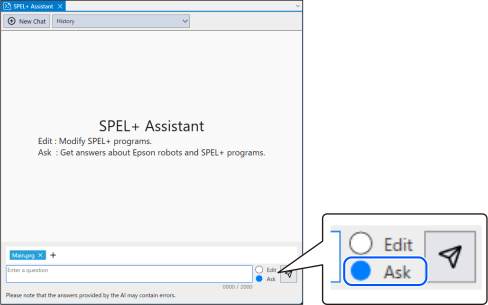
The SPEL+ Assistant screen is displayed. Select [Ask] using the radio button which selects [Edit] or [Ask].
← SPEL+ Assistant, Chat Ask Start-up Method and Screen Structure User Prompt Input →

© Seiko Epson Corporation 2026