• ja-JP
  • en-US
  • zh-CN
  • zh-TW
  • ko-KR
  • fr-FR
  • de-DE
  • it-IT
  • nl-NL
  • pt-PT
  • es-ES
  • ru
  • Epson RC+ 8.0 Option AI Assistant
    • 010

      • FOREWORD
        • 010-001

    • 020

      • Overview of the AI Assistant
        • 020-001

    • 030

      • Each Functions Start-up Method and Screen Structure
        • 030-001

          • Start-up Method of SPEL+ Assistant and Inline Edit, and Screen Structure
            • 030-010

              • Start-up Method of Inline Edit
              • User Prompt Input
              • Display the AI Response
          • SPEL+ Assistant, Chat Edit Start-up Method and Screen Structure
            • 030-020

              • Start-up Method of Chat Edit
              • User Prompt Input
              • Display the AI Response
          • SPEL+ Assistant, Chat Ask Start-up Method and Screen Structure
            • 030-030

              • Start-up Method of Chat Ask
              • User Prompt Input
              • Display the AI Response
          • Manual Assistant Start-up Method and Screen Structure
            • 030-040

              • Start-up Method of Manual Assistant
              • Manual Assistant Initial Screen
              • Display the AI Response
              • Edit Sent Messages
    • 040

      • User Prompt Tips
        • 040-001

    • 050

      • Specification and Restrictions
        • 050-001

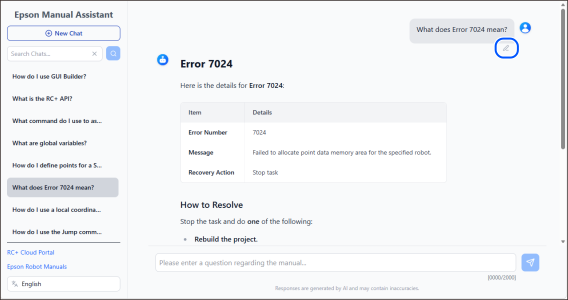
Edit Sent Messages

Messages can be reedited by clicking on the edit button of messages sent before.
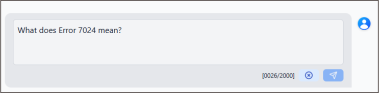
The AI responds again after you have finished editing and clicked the send button. By clicking cancel, you can discard editing.
← Display the AI Response User Prompt Tips →

© Seiko Epson Corporation 2026