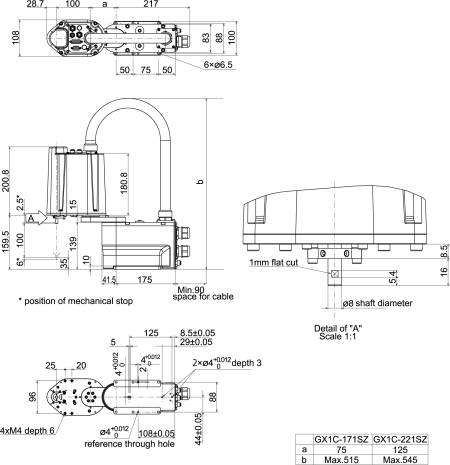
Names of Parts and Their Dimensions
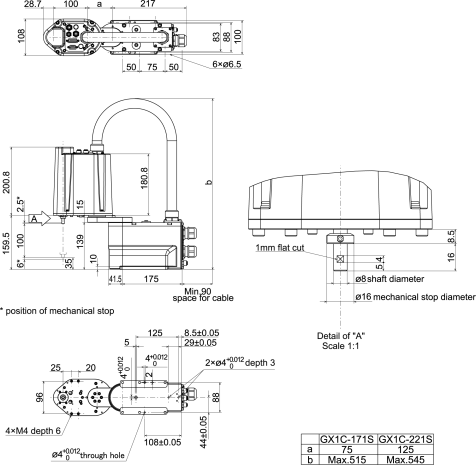
4-Axis specifications
Standard specifications GX1-C** 1S
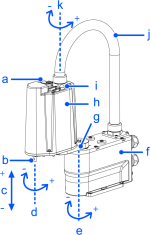
| Symbol | Description |
|---|---|
| a | Joint #3 brake release switch |
| b | Shaft |
| c | Joint #3 (up/down movement) |
| d | Joint #1 (rotation) |
| e | Joint #2 (rotation) |
| f | Base |
| g | Arm1 |
| h | Arm #2 |
| i | Indicating lamp |
| j | Conduit tube |
| K | Joint #3 (rotation) |
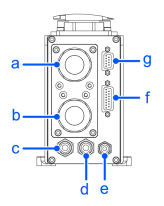
| Symbol | Description |
|---|---|
| a | Power cable |
| b | Signal cable |
| c | Fitting for ø6 mm tube (white) |
| d | Fitting for ø6 mm tube (blue) |
| e | Fitting for ø4 mm tube (blue) |
| f | User connector (15-pin D-sub connector) |
| g | User connector (9-pin D-sub connector) |
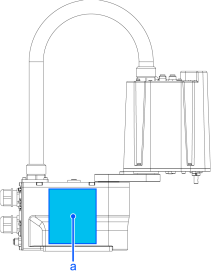
| Symbol | Description |
|---|---|
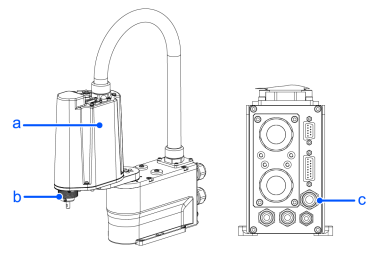
| a | Face plate (serial number of Manipulator) |
Note
When the brake release switch is pressed in emergency mode, the brake for Joint #3 is released.
When the LED lamp is on or the Controller is power is on, current is being applied to the Manipulator. Performing any work procedure with the power turned on is extremely dangerous and may result in electric shock and/or malfunction of the robot system.
Before starting any maintenance work, be sure to turn off the Controller and inform others in the surrounding area that work is in progress. Performing any work procedure with the power turned on is extremely dangerous and may result in electric shock and/or malfunction of the robot system.
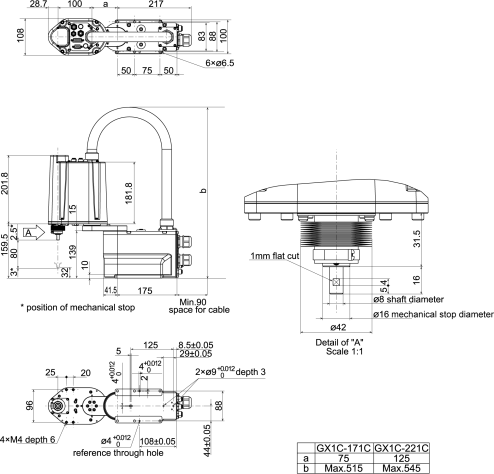
Cleanroom & ESD specifications GX1-C** 1C
The parts shown below differ from the standard specifications.
| Symbol | Description |
|---|---|
| a | Plating covers (anti-static specifications) |
| b | Lower bellows |
| c | Exhaust port |
3-Axis specifications
Standard specifications GX1-C** SZ
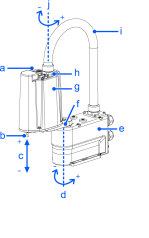
| Symbol | Description |
|---|---|
| a | Joint #3 brake release switch |
| b | Shaft |
| c | Joint #3 (up/down movement) |
| d | Joint #1 (rotation) |
| e | Base |
| f | Arm #1 |
| g | Arm2 |
| h | Indicating lamp |
| i | Conduit tube |
| j | Joint #2 (rotation) |
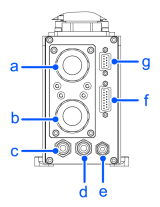
| Symbol | Description |
|---|---|
| a | Power cable |
| b | Signal cable |
| c | Fitting for ø6 mm tube (white) |
| d | Fitting for ø6 mm tube (blue) |
| e | Fitting for ø4 mm tube (blue) |
| f | User connector (15-pin D-sub connector) |
| g | User connector (9-pin D-sub connector) |
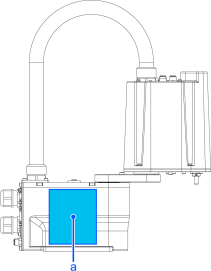
| Symbol | Description |
|---|---|
| a | Face plate (serial number of Manipulator) |
Note
When the brake release switch is pressed in emergency mode, the brake for Joint #3 is released.
When the LED lamp is on or the Controller is power is on, current is being applied to the Manipulator. Performing any work procedure with the power turned on is extremely dangerous and may result in electric shock and/or malfunction of the robot system.
Before starting any maintenance work, be sure to turn off the Controller and inform others in the surrounding area that work is in progress. Performing any work procedure with the power turned on is extremely dangerous and may result in electric shock and/or malfunction of the robot system.