Hand type
Hands compatible with Epson RC+ hand functions are indicated in the table below.
| Hand type | Mechanism | Power source | Connection method | I/O points (When viewed from the controller) |
|---|---|---|---|---|
| Grippers | Chuck | Pneumatic | I/O connection | Output: two points or less AND Input: two points or less |
| Electric | ||||
| Suction | Pneumatic | |||
| Electric | ||||
| Electric screwdrivers | - | Electric | I/O connection | Output: six points or less AND Input: one point or less |
KEY POINTS
In addition to the types of robot hands described above, I/O control-driven hands not compatible with hand functions can still be controlled using SPEL+ commands (I/O control on and off commands).
For more information, refer to the following manual.
"SPEL+ Language Reference"
However, other types of robot hands cannot be controlled by operations performed from the [Hands] screen and the [Jog & Teach] screen described in this manual.
Gripper
In Hand Functuin of Epson RC+, gripper is the collective term used to describe hands that grip a workpiece.
Grippers primarily consist of the following two types.
- Chuck hands
- Suction hands
Chuck hands
This type of robot hand is controlled with compressed air or electric power.
It grips onto a workpiece by opening and closing the finger parts. A sensor can be attached to some chuck hands to detect whether the fingers are in an open or closed state. Prepare a tool adapter that matches the shape of the hand and robot to attach this tool to the robot.
Robot Flange Dimensions and Tool Adapter
| Item | Type |
|---|---|
| Power source | Pneumatic Electric |
| Chuck configuration | Single acting system Double acting system |
| Number of fingers | Two (Operated on a single system) Three (Operated on a single system) |
| Gripping direction | External grip (grasp the workpiece from outside) Internal grip (grasp the workpiece from inside) |
| Sensor | None One Two |
Outline diagram for mounting a chuck hand
SCARA robot
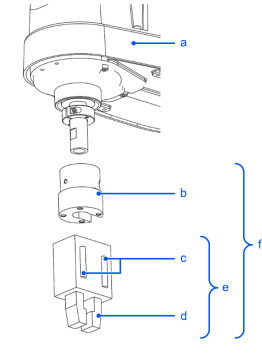
| Symbol | Item |
|---|---|
| a | SCARA robot (LA, LS, G, GX, T, RS series) |
| b | Tool adapter |
| c | Sensor (option) |
| d | Fingers |
| e | Chuck hand |
| f | Items to be prepared by the customer |
6-axis robot
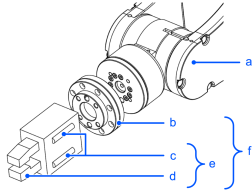
| Symbol | Item |
|---|---|
| a | 6-Axis robot (C, CX, VT, N series) |
| b | Tool adapter |
| c | Sensor (option) |
| d | Fingers |
| e | Chuck hand |
| f | Items to be prepared by the customer |
KEY POINTS
The illustrations of hand unit, fingers, and tool adapter do not represent a particular manufacturer product.
Suction hands
This type of robot hand uses compressed air or an electric pump to create a vacuum and pick up a workpiece using suction.
These hands may only use one vacuum pad, or multiple vacuum pads connected on a single pneumatic circuit. When using a vacuum generator alongside a vacuum break function as a set, the vacuum break function can be used to quickly release the workpiece.
Prepare a tool adapter that matches the shape of the hand and robot to attach this tool to the robot.
Robot Flange Dimensions and Tool Adapter
With the Epson RC+ Hand function, when you select a suction hand with two outputs, the second bit will be a vacuum break bit.
| Item | Type |
|---|---|
| Power source | Pneumatic (vacuum) Electric |
| Number of pads | One Multiple |
| Vacuum break function | None Available |
| Sensor | None One Two |
Outline diagram for mounting a suction hand
SCARA robot
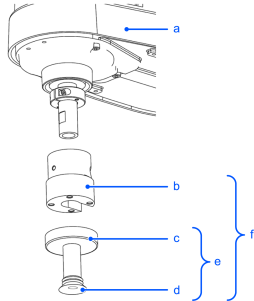
| Symbol | Item |
|---|---|
| a | SCARA robot (LA, LS, G, GX, T, RS series) |
| b | Tool adapter |
| c | Hand unit |
| d | Vacuum pad |
| e | Vacuum hand |
| f | Items to be prepared by the customer |
6-axis robot
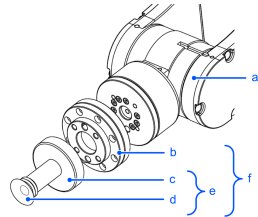
| Symbol | Item |
|---|---|
| a | 6-Axis robot (C, CX, VT, N series) |
| b | Tool adapter |
| c | Hand unit |
| d | Vacuum pad |
| e | Vacuum hand |
| f | Items to be prepared by the customer |
KEY POINTS
The illustrations of hand unit, fingers, and tool adapter do not represent a particular manufacturer product.
Electric screwdriver
This is a screwdriver used to tighten and loosen screws.
You can control the screwdriver by issuing control signals from an external device.