Setting the Mechanical Stops of Joints #1
Joints #1 have threaded holes in the positions corresponding to the angle for the mechanical stop settings. Set the motion range depending on the position of the mechanical stop (adjustable) Install the bolts in the holes corresponding to the angle that you want to set.
Install the bolts for the mechanical stop to the following position.
Joint #1 Mechanical Stops
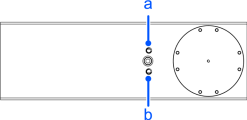
| a | b | |
|---|---|---|
| Setting Angle (°) | 122 | -122 |
| Pulse Value (pulse) | 1167451 | -176219 |
- Turn off the Controller.
- Install a hexagon socket head cap bolt into the hole corresponding to the setting angle, and tighten it.
| Joint | Hexagon socket head cap bolt | The number of bolts | Recommended tightening torque | Strength |
|---|---|---|---|---|
| 1 | M10×60 full thread | 1 bolt / side | 13.0 N·m (132.7 kgf·cm) | ISO898-1 property class 10.9 or 12.9. |
Turn on the Controller.
Set the pulse range corresponding to the new positions of the mechanical stops.
KEY POINTS
Be sure to set the pulse range inside the positions of the mechanical stop range.
Example: Using LS50-CA0*S to set Joint #1 from -110 to +110°

Execute the following commands from the [Command Window].>JRANGE 1, -110136, 1101368 ' Sets the pulse range of Joint #1 >RANGE ' Checks the set value using Range command -110136,1101368, -491520, 491520,-806597,0, -737280, 737280Move the arm by hand until it touches the mechanical stops, and make sure that the arm does not hit any peripheral equipment during operation.
Operate the joint changed at low speeds until it reaches the positions of the minimum and maximum pulse range. Make sure that the arm does not hit the mechanical stops.
(Check the position of the mechanical stop and the motion range you set.)
Example: Using LS50-CA0*S to set Joint #1 from -110 to +110°
Execute the following commands from the [Command Window].>MOTOR ON ' Turns On the motor >POWER LOW ' Enters low-power mode >SPEED 5 ‘ Sets at low speed >PULSE 1, -110136.0, 0.0 ' Moves to the min. pulse position of Joint #1 >PULSE 1101368,0,0,0 ' Moves to the max. pulse position of Joint #1The Pulse command (Go Pulse command) moves all joints to the specified positions at the same time. Specify safe positions after considering motion of not only the joints whose pulse range have been changed, but also other joints.
If the arm is hitting the mechanical stops or if an error occurs after the arm hits the mechanical stops, either reset the pulse range to a narrower setting or extend the positions of the mechanical stops within the limit.