How to Report User Errors Defined in the Library
Define user errors.
Be sure to define not only the message but also the label.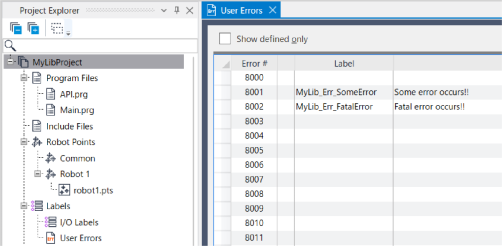
Create a function to report a user error.
Function RaiseError(errLabel$ As String)
   Integer errNum

   errNum = UserErrorNumber(errLabel$)    ' Get user error number from label
   If errNum <> -1 Then
      Error errNum
   EndIf
Fend
For more information on UserErrorNumber and Error, refer to the following manual.
"SPEL+ Language Reference"
Implement error handling.
The error handler in the library project's code calls the user error reporting function shown above.Function SomeInternalLibraryFunction ' Error occurs so throw an error RaiseError("MyLib_Err_SomeError") FendFollow the procedure below to create the library.
When using a library, if the library created above is registered to a project, it is registered to the next available error number starting from the end of the user errors.
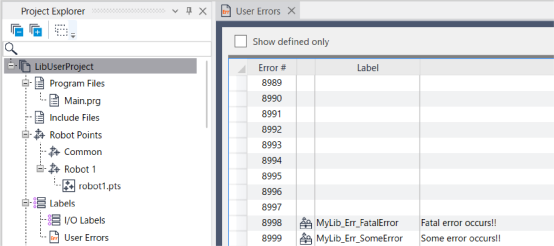
Although the error number differs from the error number at the time the library was created, errors are issued based on the user error label in the library, so that the correct message is displayed.