How to Register a Library to a Project
The procedure for registering a library to a project is described below.
Create a project that uses the library.
Select Project | Edit, or right-click on Libraries in the Project Explorer and select Add Library to open the Edit Project dialog box.
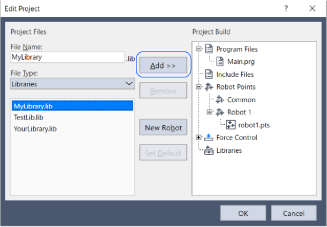
Select Library File as the file type.
A list of all the libraries in the
C:\EpsonRC80\Librariesfolder appears.Select a library and click the Add button.
Click the OK button.
The project explorer displays the available public functions and variables.
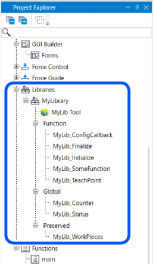
The library and its public files are added to the project. The names of the public files start with a library-defined prefix. The existence of public files varies depending on the library.
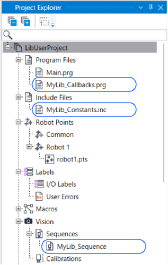
Repeat this process to add multiple libraries.
You can add up to five libraries to one project.Write the library functions you want to execute into your program.
Edit the public files in the library as needed.
NOTE
Do not register multiple libraries with the same prefix. Duplicate functions or variables may cause an error.