Releasing Registered Libraries from a Project
This section explains how to release a registered library from a project.
Right-click on the library you want to release in project explorer and select [Exclude From Project] to release the library.
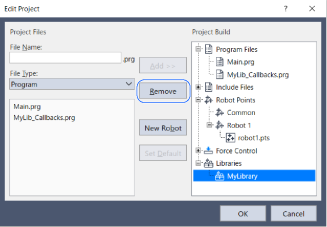
Alternatively, select Project | Edit Project to open the Edit Project dialog box.- Select the library you want to release in the project configuration tree and click the Remove button.
- Clicking the OK button closes the Edit Project dialog box and releases the library.
If necessary, also release any public files that were added along with the library. They are not released at the same time as the library.