Deleting a Library
This section explains how to delete unnecessary libraries from RC+.
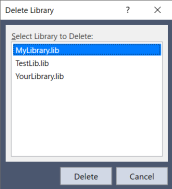
Select Extensions | Delete Library.
Select the library you want to delete from the list in the dialog box that appears.
This list contains the libraries currently held by RC+.Click the Delete button. The corresponding library is deleted from the
C:\EpsonRC80\Librariesfolder.