使用方法
依照以下說明建立OPC UA Client的程式。
前提條件:以使用OPC UA Client的程式庫等為前提。(範例:Node.js的node-opcua程式庫、Python的opcua-asyncio程式庫)
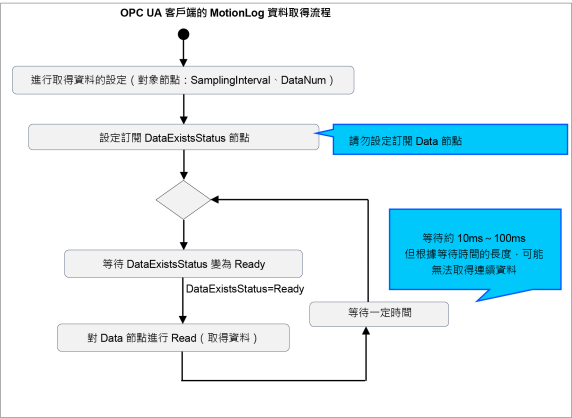
在OPC UA取得機器人控制資訊資料,並建立OPC UA Client的程式,以有效活用取得之資料。OPC UA客戶端的資料取得流程如下。
資料數量的上限設定
您可以透過DataNum節點,設定從OPC UA Server一次性取得的資料數量最大值。
資料取得週期設定
設定OPC UA Server的資料取得週期。可透過SamplingInterval節點進行設定。請注意,此與OPC UA Client的資料取得週期不同。
注意
根據資料數量的上限設定和資料取得週期設定,將可能無法取得連續的機器人控制資訊資料。屆時請將資料數量的上限設定為0,並將資料取得週期設定為較大的值。
Data節點開始讀取的時序
請將DataExistsStatus節點的狀態,設為Data節點開始讀取的判斷條件,並予以執行。亦可註冊訂閱DataExistsStatus節點。在DataExistsStatus節點的值為Stop的期間,請維持等待狀態,避免進行讀取。
讀取Data節點
可按照下列章節的說明,透過參照Data節點來讀取資料。請視需要解碼資料。
注意
- Data節點開始讀取後,請在OPC UA Client以約10 ms~100 ms的週期持續取得資料。若Data節點的讀取間隔過長,將可能導致資料缺漏。屆時,ErrorStatus節點將會變為Warning。若變為Warning,請在確認時戳等資訊後,進行適當的資料處理。
- 若想減少發生上述資料短少之情形,請實施相關對應,例如調快資料的取得週期、在DataNum設定0或200、將SamplingInterval的值增大等。
- 為確實讀取資料,請勿註冊訂閱Data節點。
ErrorStatus的對應
藉由參照ErrorStatus節點,即可判斷是否可正常取得資料。以下說明ErrorStatus節點值的意義和對應範例。
| ErrorStatus節點 | 意義 | 對應範例 |
|---|---|---|
| None | 可正常取得資料。 | 可繼續讀取Data節點。 |
| Warning | 部分資料缺漏。 載入Data節點後,ErrorStatus會變回None。 | 留意Warning時的資料缺漏,再繼續載入資料。 |
| Error | 無法透過OPC UA伺服器取得機器人控制資訊資料。 可取得機器人控制資訊資料後,ErrorStatus會變回None。 | 停止載入資料。 |
以下為以虛擬碼表示取得機器人控制資訊資料的程式。請依照您使用的OPC UA客戶端程式庫之使用方法來建立程式。
# Collect the MotionLog data from OPC UA Server of Epson Robot Controller.
# * This is pseudo code.
# Create OPC UA Client
client = create_opcua_client() # Create OPC UA Client Instance
client.connect('opc.tcp://192.168.0.1:4840') # Connect to OPC UA Server
# Get node object
node_DataNum = client.getNode('ns=1;i=20313') # DataNum Node
node_SamplingInterval = client.getNode('ns=1;i=20314') # SamplingInterval Node
node_Data = client.getNode('ns=1;i=20316') # Data Node
node_LoggingStatus = client.getNode('ns=1;i=20317') # MonitorStatus Node
node_DataExistsStatus = client.getNode('ns=1;i=20318') # DataExistsStatus Node
# Setup necessary settings
node_DataNum.setValue(0) # set DataNum
node_SamplingInterval.setValue(0) # set SamplingInterval
# Start data collection
while True: # loop for collect data
while node_DataExistsStatus.getValue() is not 'Ready': # wait to data Exists
sleep(0.01) # wait 10ms
binary_data = node_Data.getValue() # read MotionLog data
decoded_data = decode(binary_data) # decode binary data to readable format
writefile(decoded_data) # write data to file