Part Names and Functions
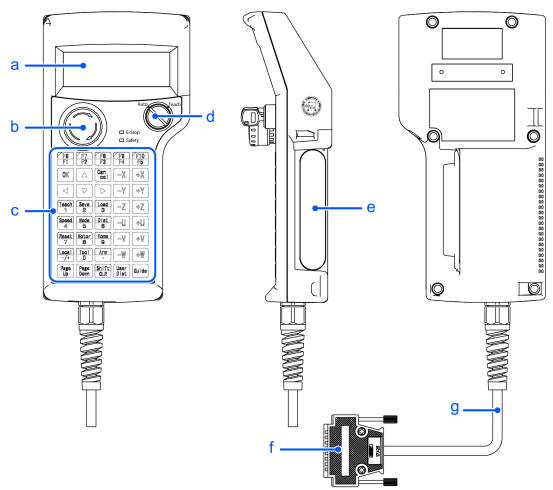
| Symbol | Description |
|---|---|
| a | **Display ** Displays various kinds of information. Displays 4 lines and 20 characters. |
| b | **EMERGENCY STOP switch ** When this switch is pushed, the Emergency Stop state is held both mechanically and electrically. Pushing the switch stops the program, removes power to robot motors and stops the robot motion immediately. For the procedure to reset the EMERGENCY STOP switch, refer to the following. |
| c | **Operation Panel ** Teaching operation, automatic operation and data input are available. |
| d | **Mode Selector Key Switch ** The mode selector key switch is used to change the operation mode between TEACH and AUTO. The mode can be fixed by pulling out the key. For the mode selecting, refer to the following. |
| e | **Enable Switch ** This is a three-position switch. Motion and I/O output commands are available while the switch is held down when the Teach Pendant is operated in TEACH mode. The switch turns ON when it is at the midpoint, and it turns OFF when it is fully held down or released. |
| f | Host Interface Connector |
| g | **Host Interface Cable (5 m) ** This is a cable to connect the Teach Pendant and the Controller. The connector is attached at the end of the cable. |