Internal Structure of CV2
How to remove the top cover
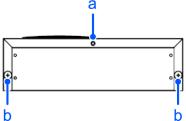
| Symbol | Description |
|---|---|
| a | Screw 1 |
| b | Screw 2 |
- Remove the screw 1 on the CV2 rear face.
- Loosen the screw 2 on the CV2 rear face.
- Slide the top cover toward the rear side while slightly lifting it up.
Internal structure of CV2
CV2 Top side
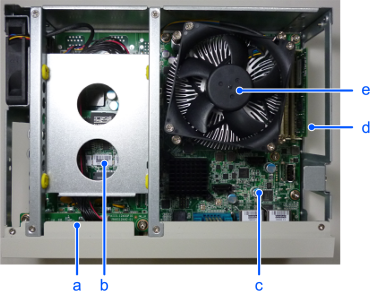
| Symbol | Description |
|---|---|
| a | LED/SW board |
| b | PoE board |
| c | CPU board |
| d | Memory |
| e | CPU fan |
Left side when facing the front side of CV2
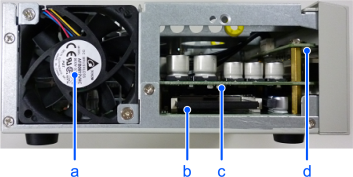
| Symbol | Description |
|---|---|
| a | Chassis fan |
| b | CFast |
| c | PoE board |
| d | LED/SW board |