I/O Cable Connection Method
Prepare the I/O connector and cable which are included with shipment.
Adaption cable
Wire capacity: 0.14 to 0.5 mm2
Wire type: single wire, stranded wire, stranded wire with rod terminalPush the edge of the cable into the wire insertion slot.
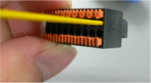
For single wire and stranded wire, peel off the covering of the cable.
KEY POINTS
- When using a stranded wire or slimmer single wire, insert it while pushing the orange colored open button.
- Be careful of the orange colored push pins because they come off easily.
- There is a cable check hole above the open button. You can check cables using a tester.