Setting Remote Control Input and Output
Remote control inputs and outputs are not allocated to fieldbus I/O by default. To allot remote control inputs and outputs to fieldbus I/O, follow the steps below.
Select Epson RC+ 8.0 menu - [Setup] - [System Configuration] and display the [System Configuration] dialog box. Select - [Controller] - [Remote Control] - [Inputs] or [Outputs].
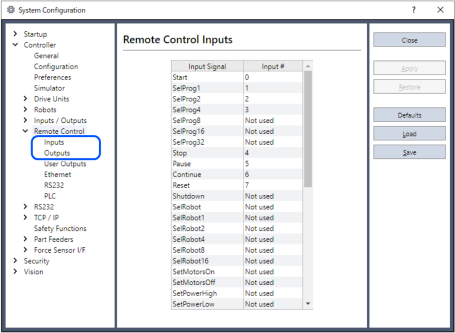
Click [Defaults] to display the [Default Remote Type] dialog box.
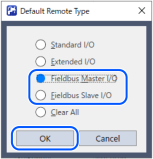
Select [Fieldbus Master I/O] or [Fieldbus Slave I/O] and click [OK].
Fieldbus I/O will be allotted default remote control input and output settings. Select bit numbers by clicking the input or output numbers corresponding to the signals to be used for remote control.
Click [Apply] to save the settings. Then, click [Close].
To enable the remote control, refer to the following manual.
"Epson RC+ 8.0 User's Guide - Remote Control"