VR Unit Confirmation
There is software to confirm whether sensor of VR unit is broken.
VR unit has function to measure acceleration. Read acceleration of gravity and determine whether the VR unit is normal.
Follow the either way to activate the software for the sensor confirmation.
- With Epson RC+ 8.0, click the [Robot Manager]-[VRT]-[Test] button.
- Activate "
C: \EpsonRC80\exe\VRU_OpCheck.exe"

Place the VR unit to position where the unit can stand still.
If the unit does not move, you can place the unit on tilted surface. At this time, you can check the VR unit even if it is not installed on the robot.
Connect the VR unit and PC with USB cable.
Select USB COM number of VR unit on [Unit setting –Select COM Port].
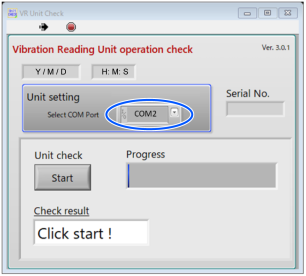
Click the [Start] button to start measurement.
5 seconds after starting the measurement, measurement results are displayed on [Check result].

When “OK!” is displayed:
VR unit operates properly.

When “Retry” is displayed:
VR unit may not be stood still.
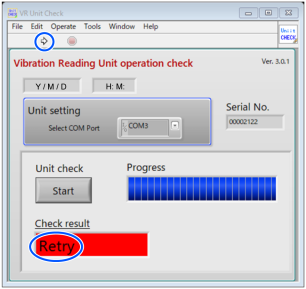
Click the Execution button
 and the [Start] button.
If “OK” is not displayed on [Check result] after clicking the Execution button and the [Start] button repeatedly, please contact us.
Ends the sensor confirmation software.