Scanner Board Diagnostic LEDs
The DeviceNet master board used with Epson RC+ has two status display LEDs.
The layout of the LEDs is shown in the following figure.
PCU-DVNIO
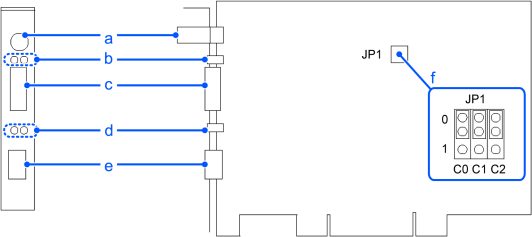
| Symbol | Description |
|---|---|
| a | 4-pin Terminal Watchdog Port (Do not use this port.) |
| b | Status Display LED (2) |
| c | DeviceNet Port |
| d | LED (2) (Unused) |
| e | RJ45 Connector (Unused) |
| f | Jumper pin for Board Address setting |
The Module/NetWork LED is on the left side and the IO LED is on the right side seen from the rear panel.
These LED names are used in applicomIO Console application and this manual. Only in this troubleshooting section, general names of the status display of the DeviceNet device are used.
- Module/NetWork LED: The Module/NetWork LED is referred to as the Network Status (NS) in this section.
- IO LED: The IO LED is referred to as the Module Status LED (MS) in this section.