Absent Slave
| Master Unit LED | Error | Description | |
|---|---|---|---|
| MS | NS | ||
| Light OFF | Green Light Blinking | Absent slave | No slave No slave (Error detection before communication establishment) Communications power supply OFF |
** Process Flowchart**
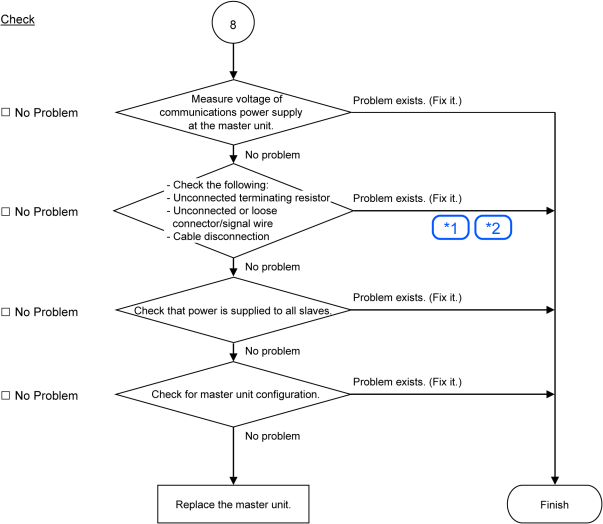
* See also:
| Symbol | See also: |
|---|---|
| 1 | Disconnected Terminating Resistors, Cable Disconnection, Disconnected Connector, and Disconnected Signal Wire |
| 2 | Loose Connector and Signal Wire |
Causes of Error
| Possible Cause | Examination Method | Countermeasure |
|---|---|---|
| Voltage drop of communications power supply | Measure voltage of communications power supply at the master unit. → Normal: 11V or more between V+ and V- If the voltage is 11 to 14 V, the unit is a possible cause. Fix the problem on the unit. | Check the voltage of the power supply. |
| Check that terminating resistors are connected to both ends of the network. → Normal: 50 to 70 Ω Measuring point: Connection of the master | Fix the problem. How to find the trouble point: Remove the terminating resistor on one end of the network. The trouble point is where resistance changes from 120 Ω. |
| Check for the connection of connectors and signal wires. → The connectors and signal wires should be firmly connected. Checkpoint: Between the master and its slaves See also: Loose Connector and Signal Wire | Connect the connectors and signal wires again. |
| All slaves power OFF | Measure the power voltage of the slaves. (It should be within the range of sufficient voltage for the slave operation.) | Supply power to the slave. |
| Master unit configuration | Start applicomIO Console application and check that the configuration has no difference with the network condition. Check that the configuration data were written in flash. See also: Epson RC+ Master Configuration | Change the configuration. |