Eccentric Quantity and the Inertia Setting
CAUTION
- The eccentric quantity of the hand and workpiece must not exceed 150 mm for LS8-C and 100 mm for LS4-C. The LS-C series are not designed to work with eccentric quantity exceeding 150 mm for LS8-C and 100 mm for LS4-C. Always set the Weight parameters according to the load. Setting a value that is smaller than the actual load may cause errors, excessive shock and insufficient function of the Manipulator. Also, the life cycle of parts may be shortened and positional gap due to belt tooth bumping may occur.
The acceptable moment of inertia of load for a LS-C series
- LS4-C Maximum: 100 mm
- LS8-C Maximum: 150 mm
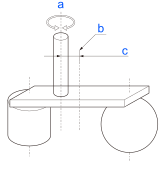
| Symbol | Description |
|---|---|
| a | Rotation center |
| b | Position of load’s center of gravity |
| c | Eccentric quantity |