Backup Setting
When you create the Self signed Server Certificate, you can configure whether to back up the created Server Certificate and private key to the PC.
CAUTION
The private key is very important for the security. Be careful managing the private key.
Select Home display Menu - [Option] - [Back up] to start configuring back up.
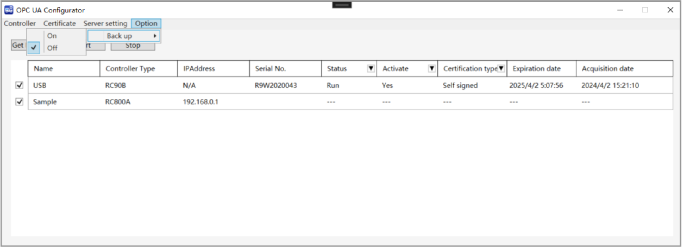
If [On] selected, the backup of file you created is automatically created.
Created files are in:
Self Signed Certificate
C:\EpsonRC80\OPCUA\[Controller serial No.]\SelfSignedfolderIf [Off] selected, no backups created.
You can backup Self signed Server Certificate created in this application, Private key file or CSR and Private key file. However, a virtual RC800 series controller or a controller with firmware version 8.0.0.xx or later, does not generate a backup for the Private key file.
CA signed Server Certificate, a Server Certificate prepared by customer, Client Certificate and CRL need to be backed up by the customers.