Basic Setting for Server
This section describes basic server settings.
CAUTION
Be careful when changing encrypt method of the server. After changing the setting, client may not be able to access OPC UA Server. Make sure to check the creation, settings and connection of the certificate with referring to the following section after you’ve changed the encrypt settings.
At normal usage, do not change the setting of Server Log of OPC UA Server. Default setting is OFF.
Select a Controller to configure from the check box of Controller Information List.
Select Home display Menu - [Server Setting] - [Basic Settings].
[Basic settings] dialog to input OPC UA Server setting will be displayed.
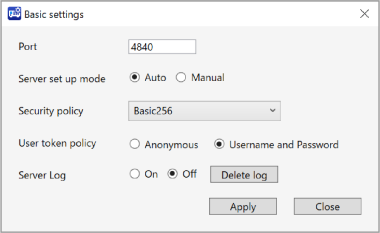
Set each item.
Items Description Port Input Port number to connect to the OPC UA Server. Do not use Port number used in following:
- Remote Ethernet
- Currently using TCP/IP Port number *
* Check your Controller setting. For details, refer to the following manual.
“Epson RC+ User’s Guide - [Setup] - [System Configuration] - [Controller] - [TCP/IP]”
Server Setup Mode It is possible to select the way to start OPC UA Server. - AUTO: Start the Server when Controller is ON.
- MANUAL: Start the Server from operation of OPC UA Configurator.
Security policy Following types of encryption scheme can be selected. - None (no encrypt)
- Basic256
- Basic256Rsa15
- Basic256Sha256
- Aes128Sha256RsaOaep
- Aes256Sha256RsaPss
Be careful when changing encryption scheme types.
User token policy Following types of User Certificate can be selected. - Anonymous
- UserName and Password
Delete log Delete log file of OPC UA Server. Server Log Following shows Log function of OPC UA Server. - On
- Off (Default)
Normally, do not change the setting.
- When changing Off to On, passcode input is required. Passcode is “199532”.
- The Server Log is turned On when a valid passcode entered. OPC UA Server will stop when the Server Log capacity exceeds the specified value.
Input items and click [Apply] button. The changes saved.
When [Apply] button clicked, a dialog displayed says the Server will be stopped.
Click [OK] button.
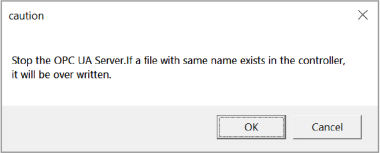
[Apply] button is not enabled when:
- some items are not inputted or unselected in setting dialog
An error dialog displayed when:
- wrong port number was inputted