Environment Required to Check Operation
The following describes the environment required to check operation.
Equipment configuration and applications
Please prepare the following equipment and applications:
- Manipulator
- Robot Controller
- RC+
- Safety PLC
- Emergency stop switch
- Teach Pendant*
*Can be used when using the Safety Limited Position (SLP) and Soft Axis Limiting.
For details on available Controllers, Manipulators, and Applications, refer to the following.
System Configuration
Equipment and wiring methods
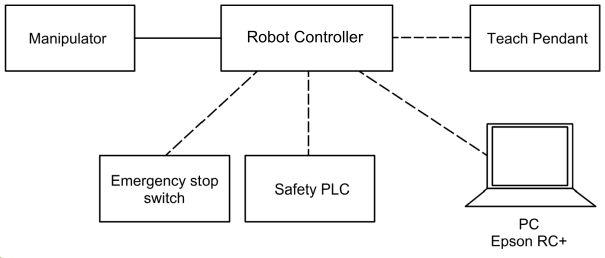
For the specific connection methods, refer to the following manual.
"Robot Controller RC700-E Manual"
"Robot Controller RC800-A Manual"
"Robot Controller RC800L Manual"
KEY POINTS
For editions higher than the Standard edition, the safety function's operation can be checked using the simulator. In this case, the safety function can be enabled by using the RC+ I/O monitor or the SPEL+ language and switching ON/OFF the safety input.
However, make sure to always start from low speed when checking the operation because the response time and stopping distance is different from the actual controller.
The following procedure is recommended when setting the safety function:
- Set the safety function with the virtual controller
- Check the safety function operation with the virtual controller
- Obtain a backup from the virtual controller
- Restore to the actual controller
- Check the operation with the actual controller in low speed
- Check the stopping distance by gradually increasing the speed, and adjust the setting and operation program of the safety function.