Common part
| Items | Descriptions |
|---|---|
During execution
Not in execution
| Show the program conditions. The following buttons are enabled during the program execution: ・ Start button ・Generate program button |
Pause
| Pause the program execution. Pause the program (waiting for trigger). (Same function as the Stop button.) |
Select VR Unit COM Port
| Select and set COM Port number. COM Port number is set when connecting VR unit and PC with USB cable. |
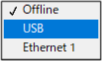
Robot Connect
| Select the connection of Epson RC+ and robot from below.
|
IP Address
| Set IP address. Setting is required when selecting “Ethernet 1” on [Robot Connect]. |
Stop
| Release the waiting for trigger condition. (Same function as the Pause button.) |