[Short movement] Tab
When the wring is difficult, create a program to measure with short moving distance.
| Items | Descriptions |
|---|---|
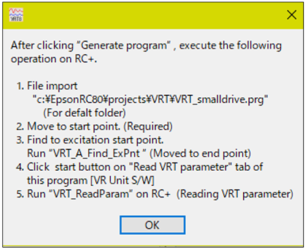
Generate program
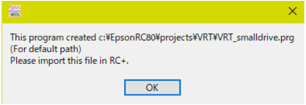
| Generate SPEL+ program for short distance motion. Click the button when all settings have completed. Generated program:
Click the button to pause the software. The following message is displayed.
|
Robot No.
| Specify the robot number to measure vibrations (install VR unit). Setting values: 1 to 16 |
Move instruction
| Select move instruction (motion command) to measure vibration. Options: Go , Move , Jump |
Point number of destination point
| Input a point number of the end point (destination point) (motion that has been vibrating). Setting value: integer number |
Arm No.
| Set additional arm number of the robot that measures vibration. Setting value: 0 to 15 |
Tool No.
| Set robot tool number of the robot that measures vibration. Setting value: 0 to 15 |
Weight
| Set the weight of hand that the arm is installed. Unit: kg |
Innertia (Left) | Left: Set inertia moment around the center of the tip joint including hand and workpiece. (inertia) Unit: kgm^2 |
(Right)  | Right: Set distance from the center of inertia of hand and workpiece of the center of the tip joint. Unit: mm |






| Go, Jump: Items | Descriptions |
|---|---|
Speed
| Specify as a percentage of maximum motion speed. Setting value: integer number from 1 to 100 Unit:% |
Accel
| Specify as a percentage of maximum acceleration. Setting value: integer number 1 or more Unit: % |
Decel
| Specify as a percentage of maximum deceleration. Setting value: 1 or more Unit: % |

| Jump: Items | Descriptions |
|---|---|
Departure Speed
| Set speed of departure motion. Setting value: integer number from 1 to 100 Unit: % |
Approach Speed
| Set speed of approach motion. Setting value: integer number from 1 to 100 Unit: % |
Departure Accel
| Set acceleration of departure motion. Setting value: integer number 1 or more Unit: % |
Approach Accel
| Set acceleration of approach motion. Setting value: integer number 1 or more Unit: % |
Departure Decel
| Set deceleration of departure motion. Setting value: integer number 1 or more Unit: % |
Approach Decel
| Set deceleration of approach motion. Setting value: integer number 1 or more Unit: % |
| Move: Items | Descriptions |
|---|---|
SpeedS
| Set speed in real number. Unit: mm/sec |
AccelerationS
| Set acceleration in real number. Unit: mm/sec^2 |
DecelerationS
| Set deceleration in real number. Unit: mm/sec^2 |
| Item | Description |
|---|---|
Operation step after generating a program
| Steps after clicking the [Generate program] button are displayed.
|