How to Activate
Use either way to activate VR software.
- With Epson RC+ 8.0, click the [Robot Manager]-[VRT]- [VRT Parameter reading] button.
- Activate "
C: \EpsonRC80\exe\VR_SW.exe"
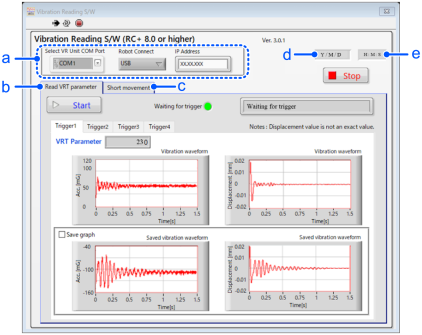
| Symbol | Descriptions | Details |
|---|---|---|
| a | Common part | |
| b | Read parameters | [Read VRT Parameter] Receive signals from VRT_Trigger command and calculate VRT parameter by results of vibration measurement by VR unit. |
| c | Create short movement | [Short movement] When the wring is difficult, create a program to measure with short moving distance. |
| d | Start date of activation | |
| e | Start time of activation |
KEY POINTS
If the VR software does not start properly, refer to the following section and troubleshoot the error.