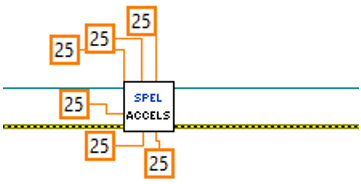
AccelS VI
Tool Palette
Epson Robots 8.0 | Robot Settings
Description
Sets the linear acceleration and deceleration for the current robot.
Inputs
| Spel Ref In | Spel reference from a previous Spel Ref Out. |
| Error In | Error condition from a previous Spel node. |
| Accel | Double value for linear acceleration. |
| Decel | Double value for linear acceleration. |
| Depart Accel | Optional. Double value for Jump depart acceleration. |
| Depart Decel | Optional. Double value for Jump depart deceleration. |
| Appro Accel | Optional. Double value for Jump approach acceleration. |
| Appro Decel | Optional. Double value for Jump approach deceleration. |
Outputs
| Spel Ref Out | Spel reference output for next VI to use. |
| Error Out | Error condition output for subsequent Spel nodes. |
Remarks
Use AccelS to set the linear acceleration and deceleration values for the current robot. All values are in millimeters / sec2.
If Depart Accel is specified, then the remaining inputs must also be specified.
If an error occurs and the ErrorNumber property of the SpelException is 3101, see the comments in the SetPoint VI.
See Also
Accel VI, Speed VI, SpeedS VI, SetPoint VI
AccelS Example