Initialize VI
Tool Palette
Epson Robots 8.0 | System
Description
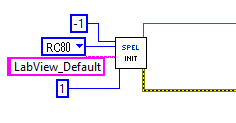
Initializes the instance of Spel used by the LabVIEW VI library.
Inputs
| Server Product Type | Specifies which Epson RC+ product to interface with. Optional. |
| Connection Number | Specifies which Controller connection to use. Optional. |
| Project | Specifies the Epson RC+ project to be used. Optional. |
| ServerInstance | Specifies which instance of Epson RC+ server to use. Optional. |
| ConnectionPassword | A character string indicating the connection password. |
| If the controller requires a password for connection but the password has not been configured in the RC+ Setup \ [PC to Controller Communications] dialog, you must set the password to connect with the controller. Optional. |
Outputs
| Spel Ref Out | Spel reference output for next VI to use. |
| Error Out | Error condition output for subsequent Spel nodes. |
Remarks
The Initialize VI must be called for each instance of the library that will be used.
Server Product Type is used to specify which Epson RC+ product to use. The default is RC80 (Epson RC+ 8.0).
When Connection Number is not specified, then the connection last used in the Epson RC+ 8.0 will be used.
When Project is not specified, the default LabVIEW Epson RC+ 8.0 project will be used. The project must be used in the Epson RC+ product specified with Server Product Type.
See Also
Shutdown VI
Initialize Example
← Inertia VI J →