Base Table
Please make or obtain the base table to secure your Manipulator.
The shape and size of the base table differs depending on the use of the robot system. For your reference, we list some Manipulator table requirements here.
The base table must not only be able to bear the weight of the Manipulator but also be able to withstand the dynamic movement of the Manipulator when it operates at maximum acceleration/deceleration. Ensure that there is enough strength on the base table by attaching reinforcing materials such as crossbeams.
The torque and reaction force produced by the movement of the Manipulator are as follows:
| LS50-C | |
|---|---|
| Max. reaction torque on the horizontal plate | 1700 N·m |
| Max. horizontal reaction force | 4400 N |
| Max. vertical reaction force | 4600 N |
CAUTION
If the vibration of the base table is large, reduce the acceleration/deceleration or increase the rigidity of the base table to reduce the vibration. Continued use in a state of large vibration may cause loosening of fastening parts or excessive load on mechanical parts, which may shorten the lifespan.
The threaded holes required for mounting the Manipulator base are M12. Use mounting bolts with specifications conforming to ISO898-1 property class 10.9 or 12.9. For dimensions, refer to the following.
The plate for the Manipulator mounting face should be 20 mm thick or more and made of steel to reduce vibration. The surface roughness of the steel plate should be 25 μm or less.
The table must be secured on the floor or wall to prevent it from moving.
The Manipulator installation surface should have a flatness of 0.5 mm or less and an inclination of 0.5° or less. If the flatness of the installation surface is improper, the base may be damaged, or the robot may not fully show its performance.
When using a leveler to adjust the height of the base table, use a screw with M16 diameter or more.
If you are passing cables through the holes on the base table, see the figures below.
(Unit : mm)
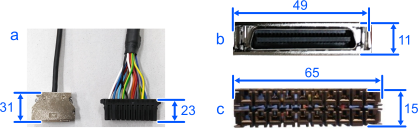
| Symbol | Description |
|---|---|
| a | M/C Cables |
| b | Signal Cable Connector |
| c | Power Cable Connector |
For environmental conditions regarding space when placing the Controller on the base table, refer to the Controller manual.
WARNING
To ensure safety, a safeguard must be installed for the robot system. For details on the safeguard, refer to the Epson RC+ User’s Guide.