Relocation
CAUTION
Install or relocate the Manipulator with two or more people. The Manipulator weights are as follows. Be careful not to get hands or feet caught and/or have equipment damaged by the Manipulator falling.
- LS50-CA02S: approx. 60 kg: 132.3 lbs. (pound)
- LS50-CA04S: approx. 61 kg: 134.5 lbs. (pound)
Turn OFF the power on all devices and unplug the cables.
KEY POINTS
Remove the mechanical stops if using them to limit the motion range of Joints #1 and #2. For details on the motion range, refer to the following.
Motion Range Setting by Mechanical StopsCover the arm with a sheet so that the arm will not be damaged.
Insert the bolt to the screw hole on the arm and tie the bolt with the metal duct using a string. When fixing the arm using the shaft, fix it with adequate strength so as not to deform the spline. For details on the strength of the ball screw spline, refer toStrength of the Ball Screw Spline
Example of Securing the Arm
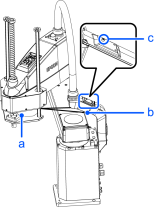
| Symbol | Description |
|---|---|
| a | Eye bolts |
| b | Wire tie |
- Hold the bottom of Arm #1 by hand to unscrew the anchor bolts. Then, remove the Manipulator from the base table.
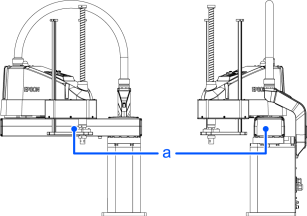
(Figure: LS50-CA04S)
| Symbol | Description |
|---|---|
| a | Center of gravity |