Controller settings
This section describes the procedure for making controller settings to communicate with an SRCI-compliant PLC.
Make the controller settings according to the procedure below.
- Mount the PROFINET slave module and install the software. For details on the mounting method and installation method, refer to the following manual.
"Robot Controller Option Fieldbus I/O" - From RC+, select [Setup] - [System Configuration] to open the [System Configuration] dialog box.
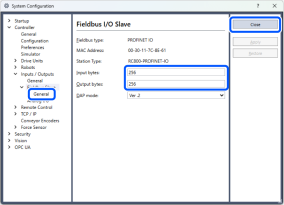
- Select [Controller] - [Inputs / Outputs] - [Fieldbus Slave] - [General], enter the input bytes and output bytes of the fieldbus, and press the [Apply] button.
NOTE
This setting is the communication size with the PLC. The recommended value is 256 bytes, but is not limited to this size. However, if you set a size that is too small, you may need to exchange data multiple times to send and receive one command, which may reduce the response speed.
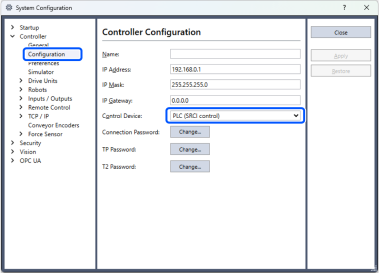
- Select [Controller] - [Configuration], switch the control device to "PLC (SRCI control)", and then press the [Apply] button.
- Press [Close] to restart the controller.
- After restarting, switch the [Connection Status] of RC+ to [Offline], and cut it off from the controller.