System Configuration
Safety devices can be connected to the safety I/O connectors of the Robot Controller.
- Connect the safety outputs of safety devices to the safety inputs of the safety I/O connectors.
- Connect the safety inputs of safety devices to the safety outputs of the safety I/O connectors.
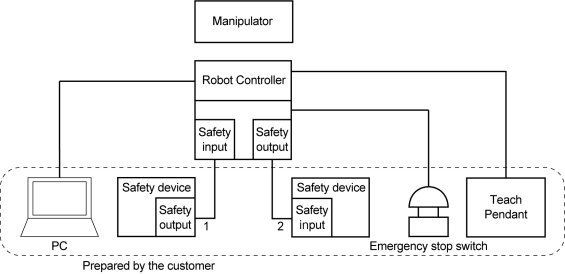
Example of system configuration using the Robot Controller safety functions:
KEY POINTS
For details on how to connect safety devices and the Robot Controller, refer to the following manual.
"Robot Controller RC700-E Manual"
"Robot Controller RC800-A Manual"
"Robot Controller RC800L Manual"
Each safety function can be used in the following operating environment.
| Manipulator | Controller | Application | Safety board firmware | |
|---|---|---|---|---|
| RC+8.0 | RC+7.0 | |||
| GX4-B/GX8-B | RC700-E | Ver.8.0.0 or later | Ver.7.5.4 or later | Rel.02.00.00.0033 or later |
| GX10-B/GX20-B | Ver.7.5.4A or later | |||
| C4-B/C8-B/C12-B | Ver.7.5.4C or later | |||
| GX4-C/GX8-C | RC800-A | Not available for use | Rel.02.01.00.0009 or later | |
| GX10-C/GX20-C | Ver.8.0.0.3 or later | |||
| GX1-C | Ver.8.1.0.0 or later | Rel.02.03.00.0013 or later | ||
| LS4-C/LS8-C | Ver.8.1.2.0 or later | Rel.02.03.00.0018 or later | ||
| LS14-C | Ver.8.2.0.0 or later | Rel.02.03.00.0018 or later | ||
| LS20-C | Ver.8.1.2.0 or later | Rel.02.03.00.0018 or later | ||
| LS50-C | Ver.8.1.0.0 or later | Rel.02.03.00.0013 or later | ||
| RS4-C/RS6-C | Ver.8.1.1.0 or later | Rel.02.03.00.0013 or later | ||
| C8-C/C12-C | Ver.8.1.0.0 or later | Rel.02.01.00.0009 or later | ||
| CX4-A/CX7-A | Ver.8.1.2.0 or later | Rel.02.03.00.0018 or later | ||
| LA3-A/LA6-A | RC800L | Ver.8.1.0.0 or later | Rel.02.03.00.0016 or later | |
| LA10-A | Ver.8.2.0.0 or later | Rel.02.03.00.0018 or later | ||
For the safety board's firmware version, refer to the following section.
How to Check the Version