• ja-JP
  • en-US
  • zh-CN
  • zh-TW
  • ko-KR
  • fr-FR
  • de-DE
  • it-IT
  • nl-NL
  • pt-PT
  • es-ES
  • ru
  • Robot Controller Safety Function Manual
    • 005

      • Introduction
        • 005-010

    • 020

      • Overview of the Robot Controller Safety Functions
        • 020-010

    • 030

      • Details of Robot Controller Safety Functions
        • 030-010

          • Main Functions
          • Safe Torque OFF (STO)
          • Safe Stop 1 (SS1)
          • Emergency Stop
          • Enable
          • Safety Limited Speed (SLS)
          • Safety Limited Speed (SLS) for a SCARA Manipulator
          • Safety Limited Speed (SLS) for a 6-Axis Manipulator
          • Safety Limited Position (SLP)
          • Robot Monitoring Range for a SCARA Manipulator
          • Monitoring Areas for a SCARA Manipulator
          • Robot Monitoring Range for a 6-Axis Manipulator
          • Monitoring Areas for a 6-Axis Manipulator
          • Joint Angle Limit
          • Joint Angle Limit for the Manipulator
          • Soft Axis Limiting
          • Safety Inputs
          • Safety Outputs
    • 040

      • Setting Safety Functions (Setting Software: Safety Function Manager)
        • 040-010

        • 040-020

        • 040-030

        • 040-040

        • 040-045

        • 040-050

        • 040-060

        • 040-070

    • 050

      • Example of Using Safety Functions
        • 050-010

Enable

Outline and Operation Patterns for Enable

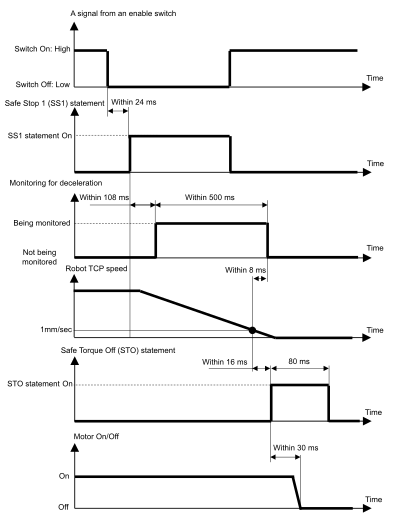
When the enable switch is OFF (is in a position other than the middle position), Safe Stop 1 (SS1) is executed and then Safe Torque OFF (STO) is executed, performing a protective stop.

Relationship between Enable and the STO statement
← Emergency Stop Safety Limited Speed (SLS) →

© 2025 Seiko Epson Corp.