How to Change the Set Value on the Master Side
Set "0x0000" of UINT below.
TCP/IP Interface Object (F5h) class - Instance #1 - Attribute #13 Encapsulation Inactivity Timeout
Describe the procedures to set on applicomIO 4.2 Console application.
Connect the fieldbus master and the slave.
Select [Network] - [Online Action] on the menu of the [applicomIO Console] application.
The [Outline Action] dialog box appears. Select the [Explicit Message] tab.
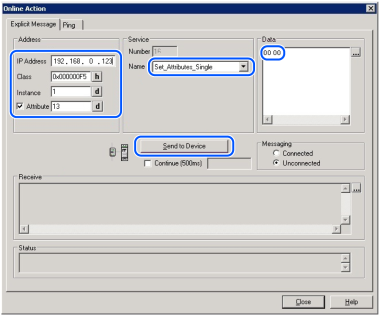
Set as follows:
Address
IP Address: address of the fieldbus EtherNet/IP slave
Class: 0x000000F5
Instance: 1
Attribute: 13Service
Name: Set_Attribute_Single
Data: 0000
Click [Send to Device].
Confirm that the "CIP Status: 0x0. Success" is displayed on the [Status].
Changing the setting is complete.