Installing EtherCAT Slave Module
WARNING
Make sure that the power is turned OFF before installing/removing any modules or connecting/disconnecting any cables. Working with the power ON is extremely hazardous and may result in electric shock and/or malfunction of equipment.
CAUTION
Pay attention to the followings in order to prevent the connector from coming off.
- Use the connectors attached to the module.
- Insert the connectors all the way seated.
- Fix the cables at proper positions in order not to put a load on the connectors.
CAUTION
Use the Controller firmware and the EtherCAT module in the following combinations. It does not guarantee the correct motions if you use any combination other than those listed below.
| Controller | Controller Firmware Version | EtherCAT Module Version |
|---|---|---|
| T/VT series | Before 7.5.54.14 | V.2.01 |
| 7.5.54.14 or later | V.2.01 | |
| V.2.24 |
KEY POINTS
Refer to the following manual to check the firmware version.
"Epson RC+ 8.0 User's Guide "[System Configuration] Command (Setup Menu)" [Setup] - [System Configuration] - [Controller] - [Preferences]"
KEY POINTS
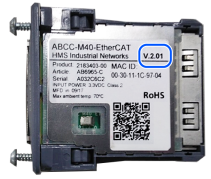
The module version of EtherCAT is indicated on the label on the back of the module.