EtherNet/IP Slave Module
WARNING
Make sure that the power is turned OFF before installing/removing any modules or connecting/disconnecting any cables. Working with the power ON is extremely hazardous and may result in electric shock and/or malfunction of equipment.
CAUTION
Pay attention to the followings in order to prevent the connector from coming off.
- Use the connectors attached to the module.
- Insert the connectors all the way seated.
- Fix the cables at proper positions in order not to put a load on the connectors.
CAUTION
Use the Controller firmware and the EtherNet/IP module in the following combinations. It does not guarantee the correct motions if you use any combination other than those listed below.
| Controller | Controller Firmware Version | EtherNet/IP Module Version |
|---|---|---|
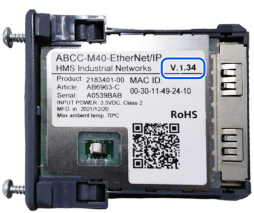
| T/VT series | Before 7.5.54.14 | V.1.34 |
| 7.5.54.14 or later | V.1.34 | |
| V.1.58 | ||
| RC800 Series | All versions | V.1.58 |
KEY POINTS
Refer to the following manual to check the firmware version.
"Epson RC+ 8.0 User's Guide [System Configuration] Command (Setup Menu) [Setup] - [System Configuration] - [Controller] - [Preferences]"
KEY POINTS
The module version of EtherNet/IP is indicated on the label on the back of the module.