Electronic Information File (ESI file)
An ESI (EtherCAT Slave Information) file is supplied for EtherCAT slave board network configuration.
The file is located in the following folder where Epson RC+ 8.0 is installed.
C:\EpsonRC80\Fieldbus\EtherCAT
Compatible list of ESI file
| Controller | File Name |
|---|---|
| RC700 series | Epson RC700_ECT rev1.00.xml |
| EPSN_RC700_ECT_V2.3_for_OMRON_rev2.xml | |
| RC90 series | Epson RC90_ECT rev1.00.xml |
| EPSN_RC90_ECT_V2.3_for_OMRON_rev2.xml |
KEY POINTS
Cautions when connecting OMRON PLC and this option:
Use the following ESI files specialized for the OMRON’s PLC.
C:\EpsonRC80\Fieldbus\EtherCAT
EPSN_RC90_ECT_V2.3_for_OMRON_rev2.xml
Epson RC800_ECT Manual_Setting rev1.00.xml
On the OMRON’s setting tool (Sysmac Studio), set as follows according to the input/output size set for this option and the data type (USINT/REAL).
USINT: Unsigned integer (1 byte)
REAL: Floating point (4 bytes)
When "32" bytes is set for [Input Bytes], select "RxPDO (USINT32byte)" or "RxPDO (REAL32byte)".
When "64" bytes is set for [Input Bytes], select "RxPDO (USINT64byte)" or "RxPDO (REAL64byte)".
When "128" bytes is set for [Input Bytes], select "RxPDO (USINT128byte)" or "RxPDO (REAL128byte)".
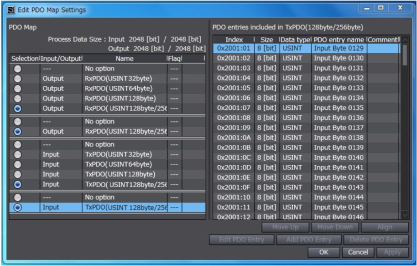
When "256" bytes is set for [Input Bytes], select two of "RxPDO (USINT128byte/256byte)" or "RxPDO (REAL256byte)".
When "32" bytes is set for [Output Bytes], select "TxPDO (USINT32byte)" or "TxPDO (REAL32byte)".
When "64" bytes is set for [Output Bytes], select "TxPDO (USINT64byte)" or "TxPDO (REAL64byte)".
When "128" bytes is set for [Output Bytes], select "TxPDO (USINT128byte)" or "TxPDO (REAL128byte)".
When "256" bytes is set for [Output Bytes], select two of "TxPDO (USINT128byte/256byte)" or "TxPDO (REAL256byte)".
Example: When [Input] is "256" bytes and [Output] is "256" bytes on this option, settings on the OMRON’s setting tool (Sysmac Studio) are as follows: