Timeout and Delay
A: Hands with an input
If a hand with one or two input points from the hand is selected in the [Type] field on the [Configure Robot Hand *] screen, you can enable or disable the timeout function, and specify the timeout (Unit: [ms]).

[Timeout] check box
When this check box is selected, the timeout setting is enabled.
- When enabled:
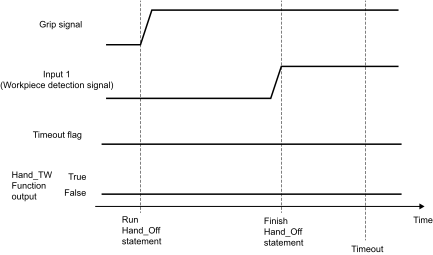
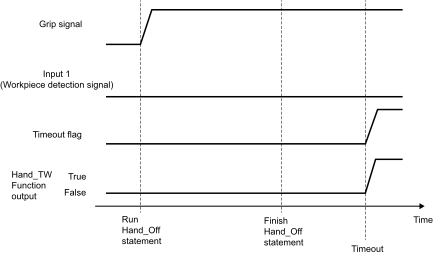
The controller will wait until a motion successful input signal is received from the hand after the Hand_On or Hand_Off command is executed. However, if the time specified as the timeout duration elapses the command will time out, and the next command will be executed. You can acquire the timeout status with the Hand_TW function. - When disabled:
When the Hand_On command or the Hand_Off command is executed, the controller will proceed to the next command immediately.
Timeout
Specify the duration used to determine a timeout.
Specification range: 10 [ms] ~ 10000 [ms]
Specification value: Integer values only
If the input signal from the hand enters the motion success state within the timeout duration:
If the input signal from the hand does not enter the motion success state within the timeout duration:
B: Hands without an input
If a hand without an input point from the hand is selected in the [Type] field on the [Configure Robot Hand *] screen, you can set whether there is a delay (standby time) before the next command is issued, and the delay duration (Unit: [ms]).

[Delay] check box
When this check box is selected, the delay setting is enabled.
- When enabled:
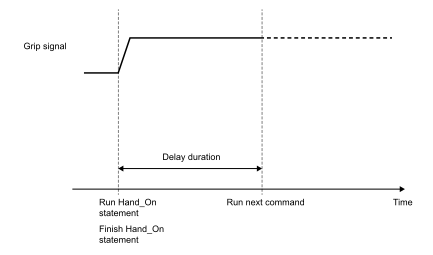
When the Hand_On command or the Hand_Off command is executed, the controller will wait for the period specified in the [Delay] field before proceeding to the next command. - When disabled:
When the Hand_On command or the Hand_Off command is executed, the controller will proceed to the next command immediately.
Delay
Specify the standby duration before the controller proceeds to the next command.
Specification range: 10 [ms] ~ 10000 [ms]
Specification value: Integer values only
When a delay is set:
C: Electric screwdriver
The timeout and delay duration cannot be set when “Screwdrivers” (electric screwdriver) is selected in the [Series] field of the [Configure Robot Hand *] screen. When this is selected, the controller will immediately proceed to the next command after the Hand_On command or the Hand_Off command is executed.
The [Timeout] and [Delay] options will not be shown when electric screwdriver is selected.
