Check Grip Status
A sensor mounted on the chuck hand, or a pressure sensor attached to the vacuum generator can be used to detect whether the workpiece is being gripped. You can specify the input bit indicating the grip state, and the release state on the Configure Robot Hand screen according to these sensor specifications.
If the sensor input detects the grip state, the Hand_On function will return a “True” value. Conversely, if the release state is detected, the Hand_Off function will return a “True” value. Otherwise these functions will return a “False” value.
For a hand without a sensor (chuck / suction)
Provided that Hand_On/Hand_Off commands are output as configured on the Configure Robot Hand screen, the workpiece grip and release function is working properly.
For a chuck hand with a single sensor
The following diagram depicts a schematic view of the movable range of the chuck hand fingers. Assume that the finger position when gripping the workpiece (workpiece grip position) is located between the fully open and fully closed positions.
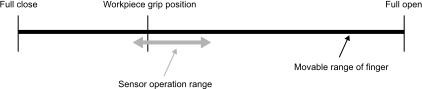
In this case, set the Hand_On, Hand_Off definition area as follows to detect whether the workpiece is being gripped. (When the sensor is connected to I/O bit 18)
Hand_On
| Hand Signal | I/O Type | Controller I/O Bit | I/O State |
|---|---|---|---|
| (Omitted) | |||
| Input1 | Input | 18: (Grip detection) | On |
Hand_Off
| Hand Signal | I/O Type | Controller I/O Bit | I/O State |
|---|---|---|---|
| (Omitted) | |||
| Input1 | Input | 18: (Grip detection) | Off |
For a chuck hand with two sensors
The following diagram depicts a schematic view of the movable range of the chuck hand fingers. Assume that the finger position when gripping the workpiece (workpiece grip position) is located between the fully open and fully closed positions.
In this case, set the Hand_On, Hand_Off definition area as follows to detect whether the workpiece is being gripped (when the sensors are connected to I/O bits 18 and 19).
Example 1: When the sensors are attached near the workpiece grip position, and near the fully open position
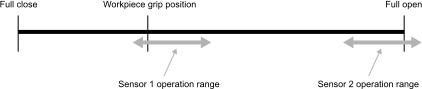
Hand_On
| Hand Signal | I/O Type | Controller I/O Bit | I/O State |
|---|---|---|---|
| (Omitted) | |||
| Input1 | Input | 18: (Sensor 1: Grip detection) | On |
| Input2 | Input | 19: (Sensor 2: Full open detection) | Off |
Hand_Off
| Hand Signal | I/O Type | Controller I/O Bit | I/O State |
|---|---|---|---|
| (Omitted) | |||
| Input1 | Input | 18: (Sensor 1: Grip detection) | Off |
| Input2 | Input | 19: (Sensor 2: Full open detection) | On |
Example 2: When the sensors are attached near the fully open position, and near the fully closed position
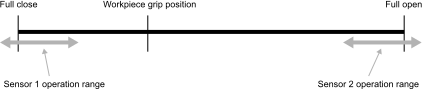
Hand_On
| Hand Signal | I/O Type | Controller I/O Bit | I/O State |
|---|---|---|---|
| (Omitted) | |||
| Input1 | Input | 18: (Sensor 1: Full close detection) | Off |
| Input2 | Input | 19: (Sensor 2: Full open detection) | Off |
Hand_Off
| Hand Signal | I/O Type | Controller I/O Bit | I/O State |
|---|---|---|---|
| (Omitted) | |||
| Input1 | Input | 18: (Sensor 1: Full close detection) | Off |
| Input2 | Input | 19: (Sensor 2: Full open detection) | On |
For a suction hand
The following diagram depicts a schematic view of pneumatic pressure within the suction hand. Executing the Hand_On command gradually shifts the hand to a vacuum state, and executing the Hand_Off command returns it to atmospheric pressure. If one or two* sensors are built into the vacuum generator, set the Hand_On, Hand_Off definition area as follows to detect whether the workpiece is being gripped. (When the sensors are connected to I/O bits 18 and 19)
*For a vacuum generator capable of setting two air pressure values that act as sensor triggers taking into account hysteresis (displacement)
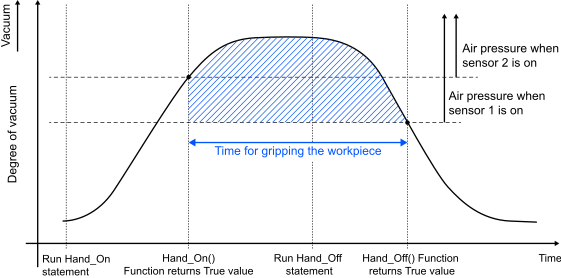
Hand_On
| Hand Signal | I/O Type | Controller I/O Bit | I/O State |
|---|---|---|---|
| (Omitted) | |||
| Input1 | Input | 18: (Sensor 1, hysteresis) | On |
| Input2 | Input | 19: (Sensor 2, setting) | On |
Hand_Off
| Hand Signal | I/O Type | Controller I/O Bit | I/O State |
|---|---|---|---|
| (Omitted) | |||
| Input1 | Input | 18: (Sensor 1, hysteresis) | Off |
| Input2 | Input | 19: (Sensor 2, setting) | Off |