Example of Hand Configuration
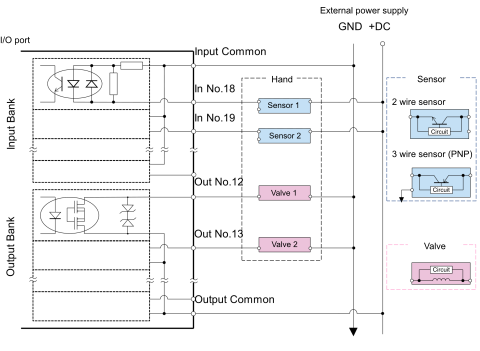
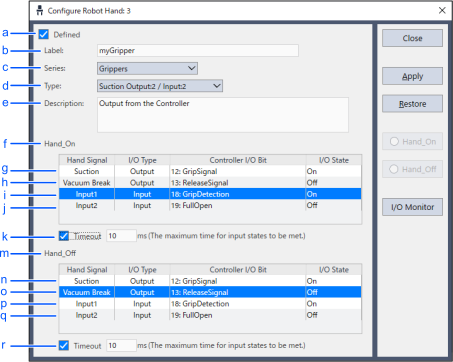
The following example describes settings when connecting a chuck hand with two output points and two input points.
| Symbol | Description | ||
|---|---|---|---|
| a | Select the [Defined] check box | ||
| b | Label | Enter a name | |
| c | Series | Select Grippers | |
| d | Type | Chuck (Select Output:2/Input: 2) | |
| e | Description | Enter a description (option) | |
| f | Hand_On (grip motion command) definition | ||
| g | Motion command: Turns output bit 12 (grip signal) on | ||
| h | Motion command: Turns output bit 13 (release signal) off | ||
| i | Motion complete condition: Standby until input bit 18 (grip detection signal) is on | ||
| j | Motion complete condition: Standby until input bit 19 (full open detection signal) is off | ||
| k | Timeout | Place a check in the [Timeout] check box The controller proceeds to the next command regardless of input signal once the timeout duration input here has elapsed | |
| m | Hand_Off (release motion command) definition | ||
| n | Motion command: Turns output bit 12 (grip signal) Off | ||
| o | Motion command: Turns output bit 13 (release signal) On | ||
| p | Motion complete condition: Standby until input bit 18 (grip detection signal) is Off | ||
| q | Motion complete condition: Standby until input bit 19 (full open detection signal) is On | ||
| r | Timeout | Place a check in the [Timeout] check box The controller proceeds to the next command regardless of input signal once the timeout duration input here has elapsed | |