Relocation
CAUTION
Install or relocate the Manipulator with two or more people. The Manipulator weights are as follows. Be careful not to get hands or feet caught and/or have equipment damaged by the Manipulator falling.
- LS4-C401*: approx. 14 kg: 30.9 lbs. (pound)
- LS8-C502*: approx. 19 kg: 41.9 lbs. (pound)
- LS8-C602*: approx. 20 kg: 44.1 lbs. (pound)
- LS8-C702*: approx. 21 kg: 46.3 lbs. (pound)
Turn OFF the power on all devices and unplug the cables. Remove the mechanical stops if using them to limit the motion range of Joints #1 and #2. For details on the motion range, refer to the following section.
Motion Range Setting by Mechanical Stops
- Set the Arm into the pose described below.
- Attach M4 bolts to each tap on the Arm #2 side and base side.
- Secure the Arm by connecting the M4 bolts together using wire ties as shown in the figure below:
*Use sheets to protect the Arm from getting damaged if necessary.
Example of Securing the Arm
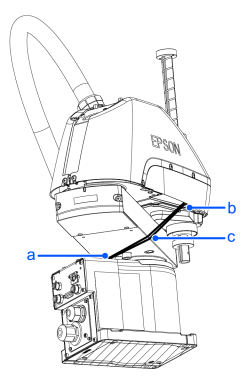
| a: M4 tap on the base side. | b: M4 tap on ARM2 side. | c: Wire tie |
|---|---|---|
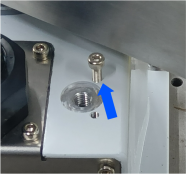 | 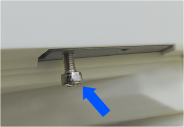 | 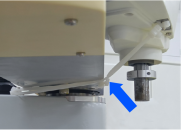 |
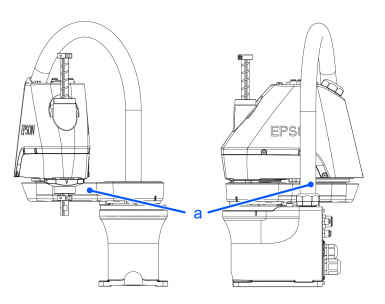
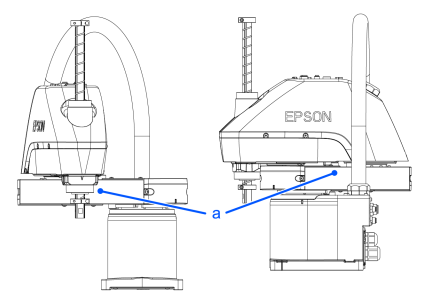
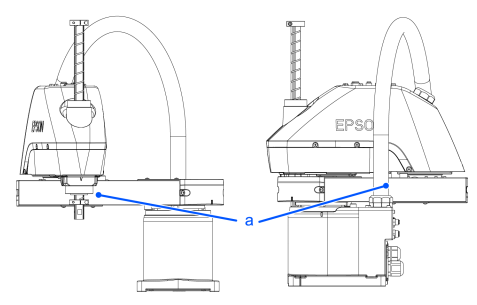
Hold the bottom of Arm #1 by hand to unscrew the anchor bolts. Then, remove the Manipulator from the base table.
LS4-C401*
LS8-C502*
LS8-C602*
LS8-C702*
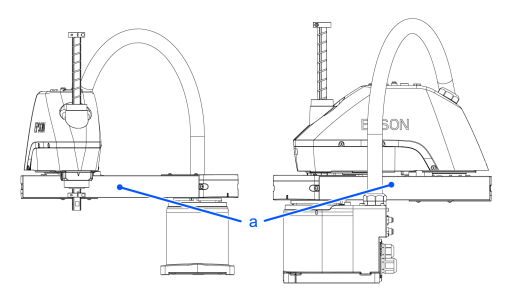
| Symbol | Description |
|---|---|
| a | Center of gravity |