General
This screen is used to configure general settings.
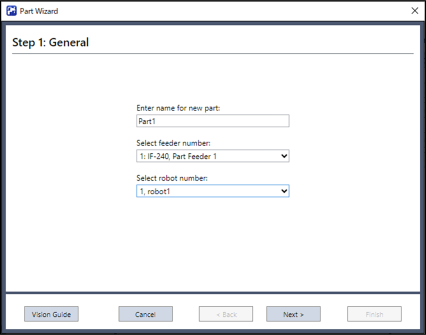
| Items | Description |
|---|---|
| Enter name for new part | Write the name of the part (Half-width alphanumeric characters and underscores only. Up to 32 characters in length). |
| Select feeder number | Select the feeder number used with this part. You can check the feeder number on the System Configuration screen. |
| Select robot number | Select the robot number. |
This table describes the basic operation of the part wizard. The part wizard is controlled using the five buttons at the bottom of the window.
| Button | Description |
|---|---|
| Vision Guide | Displays the Vision Guide screen. Use this screen to create vision sequences. |
| Cancel | Stops the Part Wizard. |
| Back | Returns to the previous STEP. |
| Next | Proceeds to the next STEP. |
| Finish | Finish the Part Wizard. |