Lighting
This screen is used to configure lighting settings.
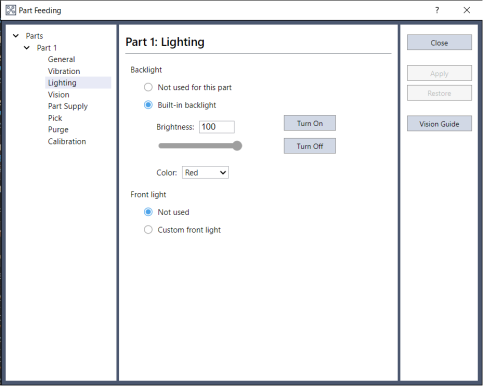
| Items | Description | |
|---|---|---|
| Backlight | Set the backlight control method. | |
| Not used for this part | Select this to not use the feeder backlight during vision image capturing. This item is optional. | |
| Built-in Backlight | Select this to use the feeder backlight during vision image capturing. This option cannot be selected if the backlight is not installed. | |
| On | Turns the feeder backlight on. | |
| Off | Turns the feeder backlight off. | |
| Brightness | Sets the brightness of the feeder backlight. Set a value between 0 and 100%. | |
| Color | Select either white or red for the backlight color (IF-A1520/ 2330/ 3540 only) | |
| Front light | Set the optional front light control method. | |
| Not used | Do not use a front light. | |
| Custom front light | Call the PF_Control callback function to control user-set custom lighting. This item is optional. Refer to the following for more information about the PF_Control Callback function. | |
KEY POINTS
Although the percentage of brightness can be set from 0 to 100%, the minimum, physical intensity may be limited depending upon the feeder model. Refer to the following for further details.
| Button | Description |
|---|---|
| Close | Closes the screen. |
| Apply | Applies changes. |
| Restore | Undo changes. |
| Vision Guide | Displays the Vision Guide screen. Use this screen to create vision sequences. |