General
This screen is used to configure general settings.
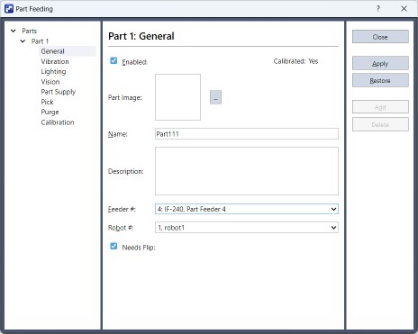
| Items | Description |
|---|---|
| Enabled | Select this check box to enable the part. An error will occur if a disabled part is specified when running the PF_Start command. |
| Part image | Available to register parts image. Click […] button to select a file of part image. The images registered here are not to be used for image processing. You can register an image that is easy for users to identify. |
| Calibration | If No, feeder calibration is required. If Yes, feeder calibration has been completed. |
| Name | Write the name of the part. (Half-width alphanumeric characters and underscores only. Up to 16 characters in length) |
| Description | Write a description (comments) for the part. This field is optional. (Up to 256 characters in length) |
| Feeder # | Select the feeder number used with this part. You can check the feeder number on the System Configuration screen. |
| Robot | Select the robot number. |
| Needs Flip | Select this check box for parts that require the front and back sides to be orientated properly. This enables a flip action used to change orientation at pick up. This may increase the number of parts that can be retrieved in a single feeder motion, improving cycle times. |
| Button | Description |
|---|---|
| Close | Closes the screen. |
| Apply | Applies changes. |
| Restore | Undo changes. |
| Add | Adds parts to the tree. Up to 32 parts can be added. |
| Delete | Deletes parts from the tree. Only parts at the bottom of the tree can be deleted. As parts in the middle of the tree cannot be deleted. Deselect the [Enabled] check box to disable them instead. |
KEY POINTS
If all parts are deleted, a build error can occur. This is because Part Feeding commands and functions are no longer available. In this case, comment out the lines which are identified in the Status window.