(4) Adjust the four vibration motors individually
To further fine-tune the action, we will explain how to adjust the four vibration motors individually.
KEY POINTS
Setting the four motors individually can sometimes allow for more precise adjustment of the action's behavior. However, because the relationship between each parameter and the action's behavior can be difficult to understand, it may take some time to find the optimal parameters before you become familiar with the process.
Deselect the [Synchronize] checkbox. This allows you to individually set the vibration amplitude of the four motors.
Click the [Expand button] under [Phase & Waveform].
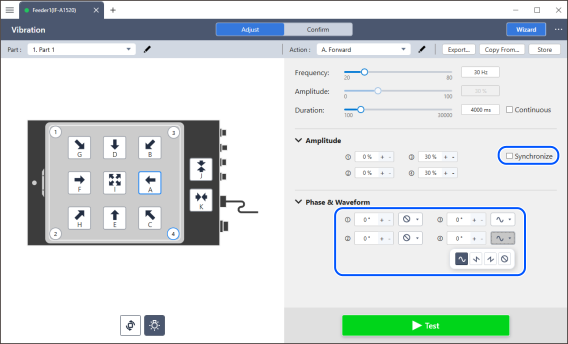
Check the movement of the workpiece while adjusting the vibration amplitude, phase, and drive waveform of each motor.