(1) Perform actions with default parameters and verify operation.
At the time of factory shipment, the default parameters are stored in part ID 26, which is saved in the flash memory of the feeder unit. The default parameters are values experimentally determined by our company to be suitable for multiple workpieces. They may not be optimal for all workpieces and conditions.
First, perform each movement action A to K using the default parameters and verify operation.
KEY POINTS
- The feeder vibrates. The vibrations may cause loud noises.
- The workpieces may fly off the platform. When operating the feeder for the first time, we recommend checking the operation with no workpieces or dummy parts.
Open the application. The [Vibration]-[Adjust] screen will be displayed.
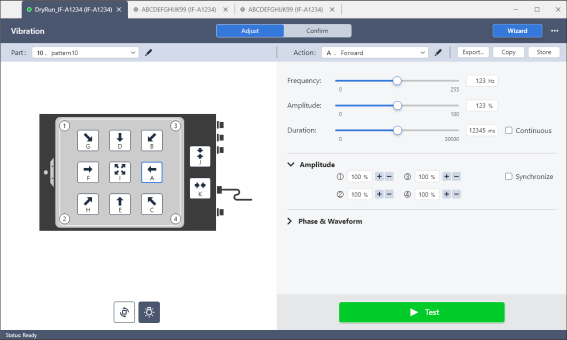
Place the workpiece whose parameters you want to adjust onto the feeder platform.
Press the action buttons from A to K to vibrate the feeder and observe the movements of the workpieces.
- If the workpiece is moving at an appropriate speed in the direction of the arrows on each action button from A to K, you can use the default parameters.
- If you encounter problems such as "the amount of movement is too small," "the movement speed is too slow," or "the workpiece falls off the platform," adjust the parameters using the method described in the next section.
KEY POINTS
- If the default parameters have been overwritten, copy and use the read-only parameters stored in part ID 26. See below for details about how to copy the parameters.
Vibration - Adjust Mode - If the orientation of the feeder as seen from the work area differs significantly from the orientation in which the feeder is installed, press the "Rotate display button" to rotate the display 180 degrees for easier viewing.