Editing of Input / Output Size and DAP Mode
You can change the input/output size of PROFINET slave board. Change parameters as necessary.
Select [Setup] - [System Configuration] and display the [System Configuration] dialog box.
Select [Controller] - [Inputs / Outputs] - [Fieldbus Slave] - [General].
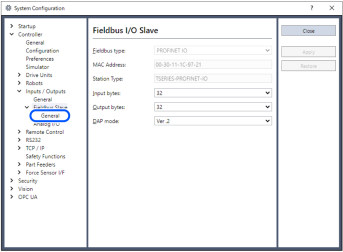
Change the settings of [Input Byte] and [Output Byte].
In this example, both of them are changed to "20" Bytes.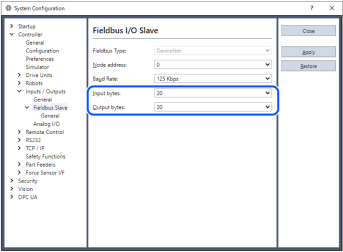
Change the setting of [DAP mode] if necessary.
Set [DAP mode] according to the PROFINET IO Controller that you want to use.
Usually, select DAP Ver.2. DAP Ver.1 is available for the obsolete PROFINET IO Controller.
KEY POINTS
The PROFINET option does not have the alert function that is an optional function in DAP Ver.2.
Click [Apply].
Click [Close].
The following dialog box appears and the Controller automatically starts rebooting.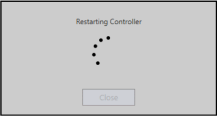
Select [Setup] - [System Configuration] and display the [System Configuration] dialog box.
Select [Controller] - [Inputs / Outputs].
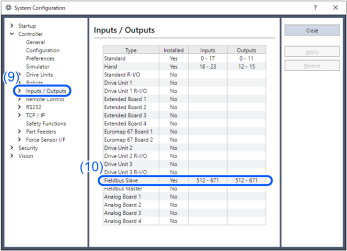
Confirm that the following items are displayed in "Fieldbus Slave".
Inputs: "512" - "512 + Changed number of input I/O (Bits)"
Outputs: "512" - "512 + Changed number of output I/O (Bits)"
In this example, Input byte is 20 bytes (160 bits) and "512 - 671" is displayed in Inputs.
Also, Output byte is 20 bytes (160 bits) and "512 - 671" is displayed in Outputs.Click [Close].
KEY POINTS
When setting this option to the PROFINET IO Controller (Master), configure as below.
The Robot Controller includes 16 pseudo I/O slots. In these slots, add 1 to 32 bytes input modules, output modules.
Make sure to add the output modules first, and then, add the input modules.
Example Input: 40 bytes / Output: 48bytes (set in the RC+ window)
Slot 1: 32 bytes output module
Slot 2: 16 bytes output module
(Set 48 bytes in total for the Output)
Slot 4: 32 bytes input module
Slot 5: 8 bytes input module
(Set 40 bytes in total for the Input.)