Property Setting Guideline for Relax Object
Step 1. Set basic information
Set properties (Name, Description, Enabled, StepID, AbortSeqOnFail) related to the basic information.
Properties | Description, setting guide |
|---|---|
| Name | Name of the force guide object. Set a particular name. |
| Description | Description for the force guide object. Describe the operations. Set a character string. |
| Enabled | Set whether to execute the force guide object. |
| True : Normal | |
| False : When you do not execute the force guide object (e.g., when you execute another force guide object instead). | |
| StepID | StepID during the force guide object execution. Set an ID. StepID is an ID which is recorded in the log data. It helps you to understand which log data support a process. It is applied when AutoStepID of the force guide sequence is False. |
| AbortSeqOnFail | It is whether to abort or continue the force guide sequence when the force guide object fails. |
True : Normal End a force guide sequence. | |
| False : Cases where the force guide sequence contains recovery operations in case of failure; cases where the sequence will be able to continue even in the event of a failure. |
Step 2. Set I/O processing before starting
Set properties (IOPreprocEnabled, IOPreprocOutputBit, IOPreprocOutputStatus) related to I/O processing before starting force guide object.
Properties | Description, setting guide |
|---|---|
| IOPreprocEnabled | Set whether to operate the output bit when starting the force guide object. You can operate only one output bit. To operate several output bit, use SPELFunc object. |
| False : Normal | |
| True : You operate the output bit, as when you use or stop a peripheral device. | |
| IOPreprocOutputBit | Set the output bit which is operated when the force guide object starts. |
| IOPreprocOutputStatus | Set whether to turn the output bit ON or OFF when the force guide object starts. Set the state to be output. |
Step 3. Set force control functions
Set properties (Fx_ControlMode, …, Tz_ControlMode, Fx_Firmness, …, Tz_Firmness, CFEnabled) related to the force control function.
Properties | Description, setting guide |
|---|---|
Fx_ControlMode Fy_ControlMode Fz_ControlMode Tx_ControlMode Ty_ControlMode Tz_ControlMode | Set a mode of the force control functions to each direction. |
When specifying Follow: Perform the follow motion by the force control functions. | |
When specifying Disabled: Force control functions are disabled. | |
Set ControlMode where you want to follow to Follow. You need to set Follow to more than one direction. | |
Fx_Firmness Fy_Firmness Fz_Firmness Tx_Firmness Ty_Firmness Tz_Firmness | Set a firmness of the force control functions to each direction. |
When setting a large value: The Force Control functions become stronger, but response to changes in force is slow. | |
When setting a small value: The Force Control function will become weaker. Response to changes in force is fast; however, vibrations can easily occur. | |
| CFEnabled | Set whether to continue the force control functions to the next force guide object. |
False : Normal Turn OFF the force control functions once, then execute the next force guide object. | |
True : When you want to start the next force guide object, and keep the force constant after contact with the prior object. True : The next force guide object must maintain the force control in the directions selected by Follow in each ControlMode. |
You can check the settings of ControlMode by a simulator. A coordinate system with grayed out except the enabled direction is displayed. However, the robot is displayed based on the current position. When you check the settings, make sure to move the robot to the position where executing the force guide object. For details on how to check by using simulator, refer to the following manual.
"Epson RC+ Simulator - Description of Functions"
Step 4. Set basic information for end conditions
Set properties (EndCheckOperator, Timeout) related to combinations of end conditions and time-out.
Properties | Description, setting guide |
|---|---|
| EndCheckOperator | This property sets how to combine the end conditions related to force and I/O. AND : End when both conditions are satisfied. OR: End when one or more conditions is satisfied. |
| Timeout | Set the time-out duration. |
When the end conditions are not set: Time-out period is the execution time. | |
When the end conditions are set: Fails when the end conditions are not satisfied within the specified time. |
Step 5. Set end conditions related to force
Set properties (ForceCheckEnabled, FollowCheckTolF, FollowCheckTolT, HoldTimeThresh) related to the end conditions of force.
Properties | Description, setting guide |
|---|---|
| ForceCheckEnabled | This property sets whether to enable the end conditions of force. True : When enabling the end conditions related to force. |
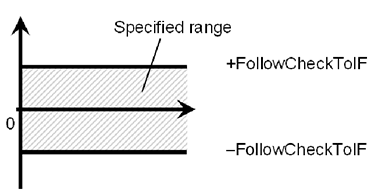
FollowCheckTolF FollowCheckTolT | This property sets a range of the translational direction or the rotational direction of the end conditions related to force. FollowCheckTolF: This property indicates the translational direction. FollowCheckTolT: This property indicates the rotational direction. |
the force direction specified by Follow in ControlMode for Fx, Fy, and Fz is Monitor the force in each direction to make sure it is within the range of -FollowCheckTolF to +FollowCheckTolF. the force direction specified by Follow in ControlMode for Tx, Ty, and Tz is Monitor the force in each direction to make sure it is within the range of -FollowCheckTolT to +FollowCheckTolT. | |
The following is an image of InsertCheckTolF.
| |
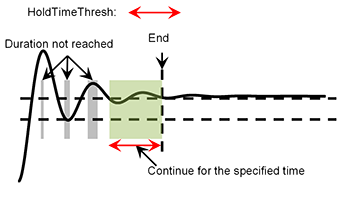
| HoldTimeThresh | Set the duration time which is used to determine whether the end conditions have satisfied. As shown below, if the specified condition continues for the time specified by HoldTimeThresh, it is determined as the end conditions are satisfied.
|
Normally, set to "0". Set the time for stabilizing the motion when the results of the next force guide object are unstable. We recommend setting the time according to the actual result which is executed after temporarily disabling the end conditions. |
Step 6. Set end conditions related to I/O
Set properties (IOCheckEnabled, IOCheckInputBit, IOCheckInputStatus) related to the end conditions of I/O.
Properties | Description, setting guide |
|---|---|
| IOCheckEnabled | This property sets whether to enable the end conditions of I/O. True : When the end conditions related to I/O are enabled. |
| IOCheckInputBit | Set an input bit which is monitored as an end condition. |
| IOCheckInputStatus | Set a state of the input bit to be an end condition. If the input bit specified by IOCheckInputBit will be the state specified by IOCheckInputStatus, it is determined as the end conditions are satisfied. |