Supporting for OPC UA for Robotics
Device Set
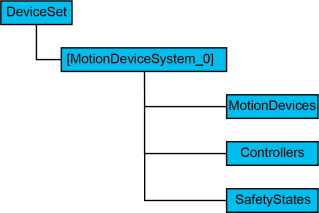
| Browse Name | Descriptions |
|---|---|
| [MotionDeviceSystem_0] | Indicates a Controller installed OPC UA Server and a device that under its control. |
| MotionDevices | Container of instance of MotionDeviceType. |
| Controllers | Container of instance of ControllerType. |
| SafetyStates | Container of instance of SafetyStateType. |
MotionDevices
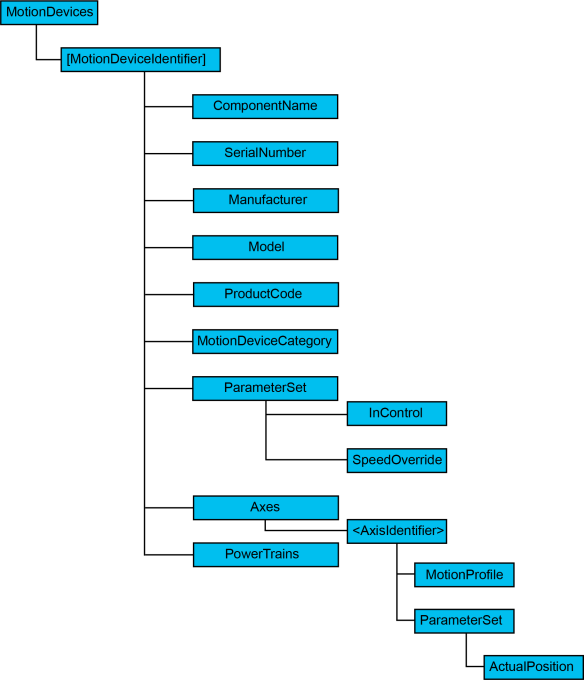
| BrowseName | Descriptions |
|---|---|
| [MotionDeviceIdentifier] | Indicates robot itself. |
| ComponentName | Indicates robot name. It is possible to setup in Epson RC+. |
| SerialNumber | Serial number of the robot. |
| Manufacturer | Manufacturer of the robot. |
| Model | Model name of the robot. |
| ProductCode | Model name of the robot. |
| MotionDeviceCategory | Robot category based on ISO 8373. (1 for 6-axis robot, 2 for SCARA robot) |
| InControl | Indicates the motor is ON or OFF. |
| SpeedOverride | Percentage of current speed. A value that can be configured in SpeedFactor command. |
| Axes | Container of instance of AxisType. |
| [AxisIdentifier] | Indicates a movable axis. |
| MotionProfile | Indicates a kind of axis. Rotation axis is 1, straight axis is 3. For example, J3 is 3 for SCARA robot, and others are 1. |
| ActualPosition | Current position of axis. |
| PowerTrains | Container of instance of PowerTrainType. |
PowerTrains
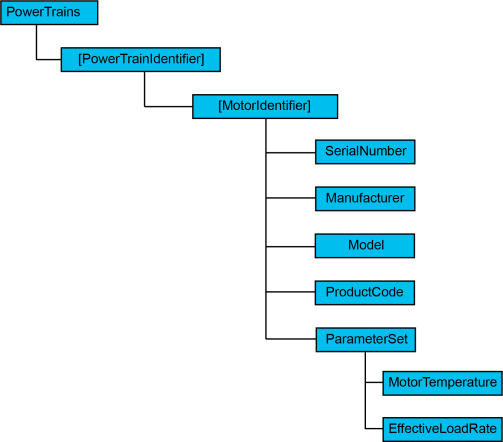
| BrowseName | Descriptions |
|---|---|
| [PowerTrainIdentifier] | Drive mechanism (a pair of motor and gear) |
| [MotorIdentifier] | Motor |
| SerialNumber | Not supported (Null) |
| Manufacturer | Not supported (Null) |
| Model | Not supported (Null) |
| ProductCode | Not supported (Null) |
| MotorTemperature | Not supported (Null) |
| EffectiveLoadRate | Loading factor of axis A value OLRate command indicates |
Controllers
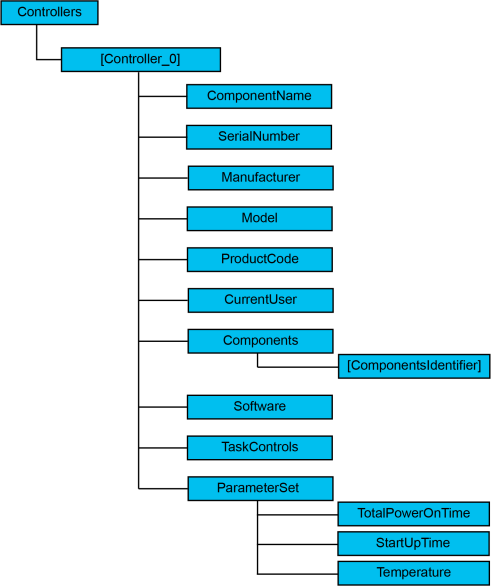
| Names | Descriptions |
|---|---|
| [Controller_0] | Controller |
| ComponentName | Controller name It can be configured in Epson RC+ |
| SerialNumber | Serial number of Controller |
| Manufacturer | Manufacturer of Controller |
| Model | Model name of Controller |
| ProductCode | Model name of Controller |
| CurrentUser | Not supported (Null) |
| Components | Container of component related to Controller |
| Software | Container of Software node |
| TotalPowerOnTime | Amount of time the Controller has been turned ON |
| StartUpTime | Last date and time the Controller has turned ON |
| Temperature | Temperature of inside of the Controller |
Software
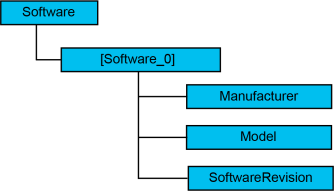
| Names | Descriptions |
|---|---|
| [Software_0] | Software |
| Manufacturer | Manufacturer of software |
| Model | Model name of software |
| SoftwareRevision | Version of software. |
TaskControls
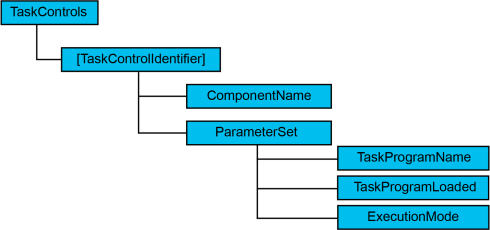
| Names | Descriptions |
|---|---|
| [TaskControlIdentifier] | Indicates tasks. For details of the task, refer to the following manual. "Epson RC+ User’s Guide" |
| ComponentName | Function name |
| TaskProgramName | Program name |
| TaskProgramLoaded | True when task is executing (includes wait or pause) |
| ExecutionMode | Indicates executing state of the program. Normal execute is CYCLE. Step in, Step over or Walk are STEP. |
SafetyStates
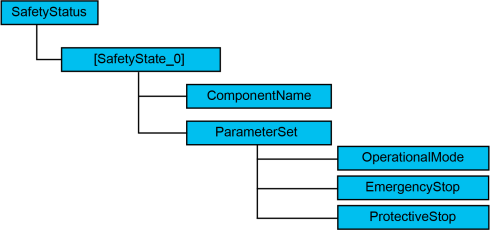
| Names | Descriptions |
|---|---|
| SafetyState_0 | Safety state of robot and Controller. |
| ComponentName | Target name of safety state. |
| OperationalMode | Current operation mode. Either of MANUAL_REDUCED_SPEED, MANUAL_HIGH_SPEED and AUTOMATIC. |
| EmergencyStop | ON/OFF in emergency stop |
| ProtectiveStop | ON/OFF in protective stop (Safety door open/close) |