Specifications of Force Sensor Node
This section describes the specifications of the force sensor node. For information on how to use it, refer to the following manual.
Acquisition of Force Sensor Data
ForceSensorMonitorSystemType ObjectType Definition
Overview
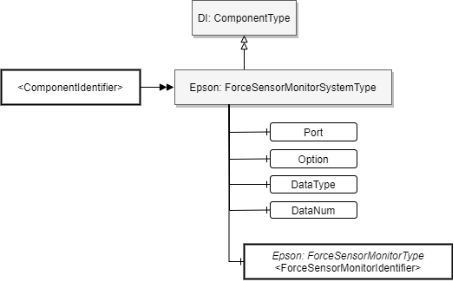
ForceSensorMonitorSystemType indicates the monitoring system for the force sensor data in the Controller. Instantiate this type for each force sensor monitoring system installed in the Controller.
ObjectType Definition
ForceSensorMonitorSystemType is defined below.
| Attribute | Value |
|---|---|
| BrowseName | ForceSensorMonitorSystemType |
| IsAbstract | FALSE |
| References | Node Class | BrowseName | DataType | TypeDefinition | ModellingRule |
|---|---|---|---|---|---|
| Subtype of the ComponentType defined in OPC Unified Architecture for Devices (DI) | |||||
| HasComponent | Variable | Port | Boolean | BaseDataVariableType | Mandatory |
| HasComponent | Variable | Option | String | BaseDataVariableType | Mandatory |
| HasComponent | Variable | DataType | Uint16 | BaseDataVariableType | Mandatory |
| HasComponent | Variable | DataNum | UInt16 | BaseDataVariableType | Mandatory |
| HasComponent | Object | [ForceSensorMonitorIdentifier] | - | Epson: ForceSensorMonitorType | MandatoryPlace holder |
ObjectType Description
Variable Port
This is a configuration node for switching the data output destination. It determines whether data will be output to OPC UA or to an existing output destination (Epson RC+).
The values are described in the following table.
Value Description True Outputs data to OPC UA. False Outputs data to Epson RC+. KEY POINTS
Data is output to either Epson RC+ or OPC UA.
Variable Option
This node is not normally used. Do not change the value.
Variable DataType
DataType is a configuration node for selecting the data to be acquired. The relationship between the value and the data to be acquired is shown in the following table.
Value Data to be acquired 0 ElapsedTime, Force, CurPos, RefPos, Diff, TCPSpeed, CurAngle, OLRate, FCOn, StepID, SeqNo, ObjNo, Time 1 ElapsedTime, CurPos, TCPSpeed, CurAngle, OLRate, StepID, SeqNo, ObjNo, Time 2 ElapsedTime, Force, CurPos, StepID, SeqNo, ObjNo 3 ElapsedTime, CurPos, StepID, SeqNo, ObjNo For details on the data to be acquired, refer to the following.
Variable DataNum
The DataNum node is used to specify the maximum number of data items to be acquired from the server at one time.
Value Description 0 Does not set maximum number of data items (Determined by server) 1~ Sets maximum number of data items Object [ForceSensorMonitorIdentifier]
[ForceSensorMonitorIdentifier] indicates that the force sensor monitoring system has one or more monitoring channels. It is expressed by an instance of ForceSensorMonitorType.
KEY POINTS
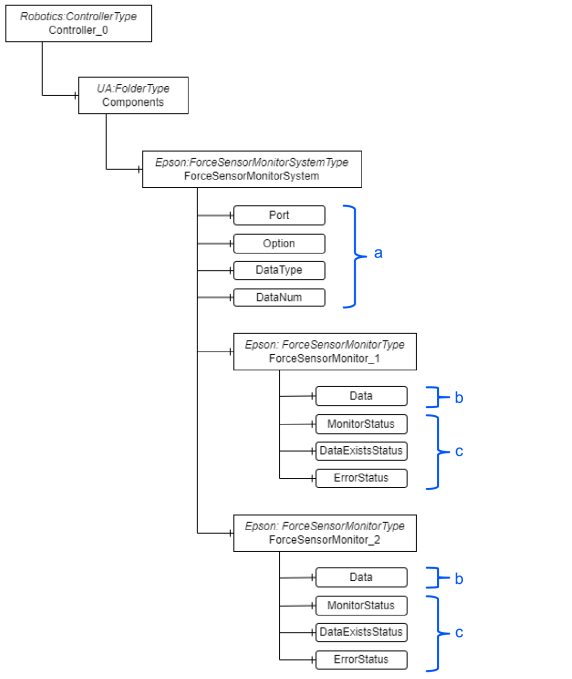
When a sensor data acquisition instruction (RecordStart) is executed, data and status are output to a node under ForceSensorMonitor_1. If two cases are executed simultaneously, the data and status of the second case will be output to a node under ForceSensorMonitor_2.
ForceSensorMonitorType ObjectType Definition
Overview
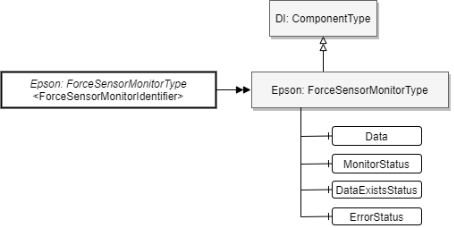
ForceSensorMonitorType indicates the monitor data generated by the ForceSensorMonitorSystemType instance. This type is instantiated for each monitor data item (each monitor channel) contained in the ForceSensorMonitorSystemType instance.
For details, refer to the following.
Specifications of Force Sensor Node - ForceSensorMonitorSystemType
ObjectType Definition
ForceSensorMonitorType is defined below.
| Attribute | Value |
|---|---|
| BrowseName | ForceSensorMonitorType |
| IsAbstract | FALSE |
| References | Node Class | BrowseName | DataType | TypeDefinition | Modelling Rule |
|---|---|---|---|---|---|
| Subtype of the ComponentType defined in OPC Unified Architecture for Devices (DI) | |||||
| HasComponent | Variable | Data | ByteString | BaseDataVariableType | Mandatory |
| HasComponent | Variable | MonitorStatus | String | BaseDataVariableType | Mandatory |
| HasComponent | Variable | DataExistsStatus | String | BaseDataVariableType | Mandatory |
| HasComponent | Variable | ErrorStatus | String | BaseDataVariableType | Mandatory |
ObjectType Description
Variable Data
This is the node to which the data will be output. When this node is read, data can be acquired by the force sensor. For the details of data format, refer to the following.
After data acquisition has successfully started by SPEL command, the data held inside the Controller at that time can be read by acquiring this node.
If there is no data held inside the Controller, Null is returned when the node is read.
The types of data that can be acquired include header, data part, and footer, all of which can be acquired from this node. Only one type of data can be acquired in a single read: header, data part, or footer. Headers and data parts, data parts and footers, and such are not mixed.
Variable MonitorStatus
Indicates the execution status of sensor data acquisition. The values are described below.
Value Description Stop Indicates that sensor data acquisition is stopped Run Indicates that sensor data acquisition is in progress
Executing the RecordStart command results in this value
Variable DataExistsStatus
Indicates whether data can be acquired from the Data node. The data acquisition timing can be determined from this value. The values are described below.
Value Description Empty Indicates that there is no data that can be acquired from the Data node Ready Indicates that there is data that can be acquired from the Data node Variable ErrorStatus
Indicates the occurrence of errors and warnings during data acquisition. From this value, you can determine how to handle the data. The values are described below.
Value Description None Indicates that there is no abnormality Warning Indicates that data overwriting has occurred
Data acquisition will continue
Error Indicates that data acquisition has been interrupted
Example of address space
The following is an example of an instance of address space when the force sensor data acquisition function is available.
| Symbol | Description |
|---|---|
| a | Configuration node |
| b | Data acquisition node |
| c | Status indicator nodes |