Specifications of the MotionLogSystemType Node
This section describes the specifications of the MotionLogSystemType node.
For information on how to use it, refer to the following manual.
This node is supported by firmware version 8.0.0.xx and later.
MotionLogSystemType ObjectType Definition
Overview
MotionLogSystemType refers to a monitoring system loaded in the Controller which monitors a robot’s motion log data.
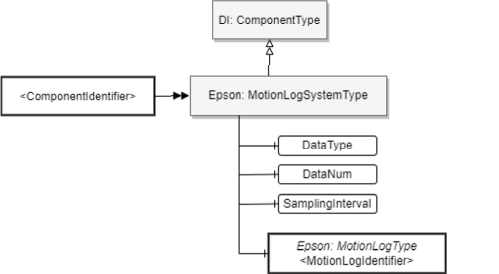
ObjectType Definition
MotionLogSystemType is defined below.
| Attribute | Value |
|---|---|
| BrowseName | MotionLogSystemType |
| IsAbstract | FALSE |
| References | Node Class | BrowseName | DataType | TypeDefinition | ModellingRule |
|---|---|---|---|---|---|
| Subtype of the ComponentType defined in OPC Unified Architecture for Devices (DI) | |||||
| HasComponent | Variable | DataType | UInt16 | BaseDataVariableType | Mandatory |
| HasComponent | Variable | DataNum | UInt16 | BaseDataVariableType | Mandatory |
| HasComponent | Variable | SamplingInterval | UInt16 | BaseDataVariableType | Mandatory |
| HasComponent | Object | [MotionLogIdentifier] | - | Epson: MotionLogType | MandatoryPlace holder |
ObjectType Description
Variable DataType
This is a configuration node for switching the dataset’s type. The only value this can be set to is “0”.
Variable DataNum
The DataNum node is used to specify the maximum number of data items to be acquired from the server at one time. The allowable values are described below.
Value Description 0 Does not set maximum number of data items (Determined by server) 1~ 200 Sets the maximum number of data items KEY POINTS
We recommend setting this to “0” unless there is a special reason to do otherwise. If you do not set DataNum to “0” or a sufficiently high value, it may not be possible to acquire continuous Motion Log data.
Variable SamplingInterval
This node is used to set the sampling interval for data acquired from the server. The minimum value this can be set to is “0”. When the sampling interval value is set to a nonzero value “n”, you can acquire data at a sampling interval that is 2^n times that of when the value is zero. The allowable values are described below.
Value Description 0~4 Sets the data sampling interval. KEY POINTS
The smaller you set the SamplingInterval, the higher the sampling rate you can acquire. However, depending on the operational environment of the Controller, you may be unable to acquire continuous Motion Log data at the designated SamplingInterval. In such cases, set a larger SamplingInterval to improve the performance.
Object [MotionLogIdentifier]
[MotionLogIdentifier] indicates the channel by which data is acquired from the MotionLog function and expresses it with a MotionLogType instance.
KEY POINTS
If no data exists, the TIMESTAMP will become “0”. Because of this, the TIMESTAMP interval may not match the value set for the SamplingInterval.
For the details on data format, refer to the following.
MotionLogType ObjectType Definition
Overview
MotionLogType indicates the data generated by a MotionLogSystemType instance (refer to Section 3.2.3.4). This Type is instantiated for each monitor channel contained in the MotionLogSystemType instance.
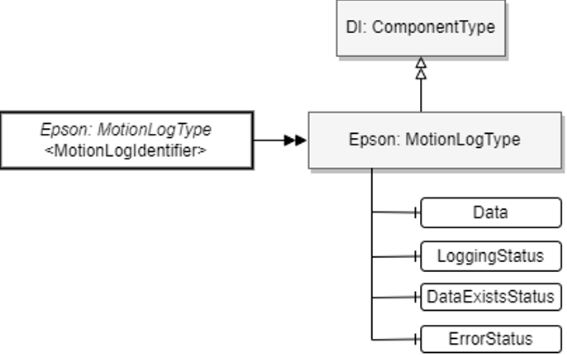
ObjectType Definition
MotionLogType is defined below.
| Attribute | Value |
|---|---|
| BrowseName | MotionLogType |
| IsAbstract | FALSE |
| References | Node Class | BrowseName | DataType | TypeDefinition | Modelling Rule |
|---|---|---|---|---|---|
| Subtype of the ComponentType defined in OPC Unified Architecture for Devices (DI) | |||||
| HasComponent | Variable | Data | ByteString | BaseDataVariableType | Mandatory |
| HasComponent | Variable | LoggingStatus | String | BaseDataVariableType | Mandatory |
| HasComponent | Variable | DataExistsStatus | String | BaseDataVariableType | Mandatory |
| HasComponent | Variable | ErrorStatus | String | BaseDataVariableType | Mandatory |
ObjectType Description
Variable Data
This is the node to which the data will be output. When this node is read, the client can acquire data recorded by the MotionLog function.
For the details of data format, refer to the following.
If there is no data held inside the controller, Null is returned when the node is read.
Variable LoggingStatus
Indicates the status of data recording by the MotionLog function. The values are described in the following table.
Value Description Stop Data recording by the MotionLog function is stopped. Run Data recording by the MotionLog function is running. Variable DataExistsStatus
Indicates whether data can be acquired from the Data node. The data acquisition timing can be determined from this value. The values are described in the following table.
Value Description Empty Indicates that there is no data that can be acquired from the Data node Ready Indicates that there is data that can be acquired from the Data node Variable ErrorStatus
Indicates the occurrence of errors and warnings during data acquisition. From this value, you can determine how to handle the data. The values are described in the following table.
Value Description None Indicates that there is no abnormality Warning Indicates that data overwriting has occurred Error Indicates that something has interrupted data recording by the MotionLog function. KEY POINTS
When the ErrorStatus is “Error,” there is no guarantee that normal data can be read, so it is recommended that the OPC UA client stop data acquisition.
When the ErrorStatus is “Warning,” it means that the acquired data is not contiguous. There is no problem with continuing to read data.
Example of address space
Indicates a series of instances of the Robot MotionLog data acquisition function’s address space.
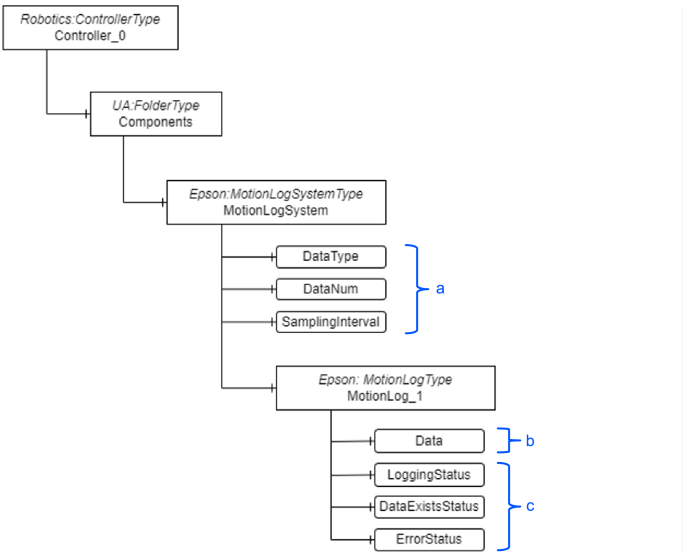
| Symbol | Description |
|---|---|
| a | Configuration node |
| b | Data acquisition node |
| c | Status indicator nodes |