機器人控制資訊節點規格
本節將說明機器人控制資訊節點規格。
關於使用方法的詳細說明,請參閱下列章節。
此節點支援韌體版本8.0.0.xx或更高版本。
MotionLogSystemType ObjectType定義
概述
MotionLogSystemType是指控制器搭載的機器人控制資訊資料之監控系統。
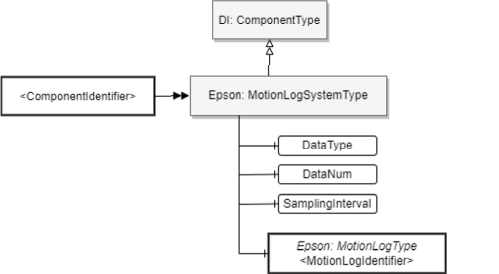
ObjectType定義
以下說明MotionLogSystemType定義。
| Attribute | Value |
|---|---|
| BrowseName | MotionLogSystemType |
| IsAbstract | FALSE |
| References | Node Class | BrowseName | DataType | TypeDefinition | ModellingRule |
|---|---|---|---|---|---|
| Subtype of the ComponentType defined in OPC Unified Architecture for Devices (DI) | |||||
| HasComponent | Variable | DataType | UInt16 | BaseDataVariableType | Mandatory |
| HasComponent | Variable | DataNum | UInt16 | BaseDataVariableType | Mandatory |
| HasComponent | Variable | SamplingInterval | UInt16 | BaseDataVariableType | Mandatory |
| HasComponent | Object | [MotionLogIdentifier] | - | Epson: MotionLogType | MandatoryPlace holder |
ObjectType說明
Variable DataType
用於切換資料集種類的設定用節點。可設定的值僅限0。
Variable DataNum
DataNum節點為用於指定從伺服器一次性取得的資料數量之最大值的節點。可設定的值如下。
值 說明 0 不設定資料數量的最大值(由伺服器側決定) 1~200 設定資料數量的最大值 提示
無特別理由時,建議設定0。DataNum未設定為0或足夠大的值時,可能會無法取得連續的機器人控制資訊資料。
Variable SamplingInterval
用於設定從伺服器取得的資料之抽樣間隔的節點。可設定的最小值為0。對於SamplingInterval為0的抽樣間隔,能以2^n(n=設定值)倍的抽樣間隔取得資料。可設定的值如下。
值 說明 0~4 設定資料的抽樣間隔 提示
SamplingInterval的設定值愈小,愈能取得更高抽樣率的值。但根據控制器的動作環境,指定的SamplingInterval將可能無法取得連續的機器人控制資訊資料。屆時,設定較大的SamplingInterval即可改善。
Object
代表MotionLog功能的資料取得通道,且根據MotionLogType執行個體顯示。
MotionLogType ObjectType定義
概述
MotionLogType代表根據3.2.3.4的MotionLogSystemType執行個體而產生的資料。針對包含在MotionLogSystemType執行個體的每個資料取得通道,將此Type執行個體化。
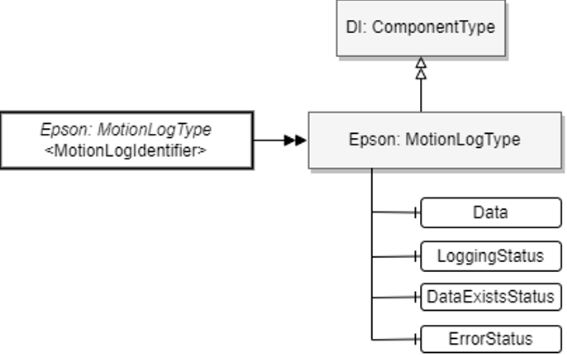
ObjectType定義
以下說明MotionLogType定義。
| Attribute | Value |
|---|---|
| BrowseName | MotionLogType |
| IsAbstract | FALSE |
| References | Node Class | BrowseName | DataType | TypeDefinition | Modelling Rule |
|---|---|---|---|---|---|
| Subtype of the ComponentType defined in OPC Unified Architecture for Devices (DI) | |||||
| HasComponent | Variable | Data | ByteString | BaseDataVariableType | Mandatory |
| HasComponent | Variable | LoggingStatus | String | BaseDataVariableType | Mandatory |
| HasComponent | Variable | DataExistsStatus | String | BaseDataVariableType | Mandatory |
| HasComponent | Variable | ErrorStatus | String | BaseDataVariableType | Mandatory |
ObjectType說明
Variable Data
作為資料輸出目的地的節點。 透過讀取此節點,客戶端即可取得MotionLog功能所記錄的資料。
關於資料格式,請參閱下列章節。
當控制器內部無保持任何資料時,讀取此節點將會回傳Null。
Variable LoggingStatus
代表MotionLog功能的資料記錄執行狀態。以下為各值所代表的內容。
值 說明 Stop 代表目前已停止MotionLog功能的資料記錄 Run 代表目前正在執行MotionLog功能的資料記錄 Variable DataExistsStatus
代表是否有可從Data節點取得的資料。您可以從此值判斷取得資料的時序。以下為各值所代表的內容。
值 說明 Empty 代表沒有可從Data節點取得的資料之狀態 Ready 代表有可從Data節點取得的資料之狀態 Variable ErrorStatus
代表在取得資料時,關於錯誤及警告的發生狀態。您可以從此值判斷資料的處置方式。以下為各值所代表的內容。
值 說明 None 代表未發生異常的狀態 Warning 代表已發生資料覆寫的狀態 Error 代表因某種原因已停止MotionLog功能之資料記錄的狀態 提示
ErrorStatus為Error時,不保證能讀出正常的資料,因此建議OPC UA客戶端停止資料取得。
ErrorStatus為Warning時,代表取得的資料不連續。可以繼續讀出資料。
位址空間範例
以下為機器人控制資訊資料取得功能的位址空間之個體化範例。
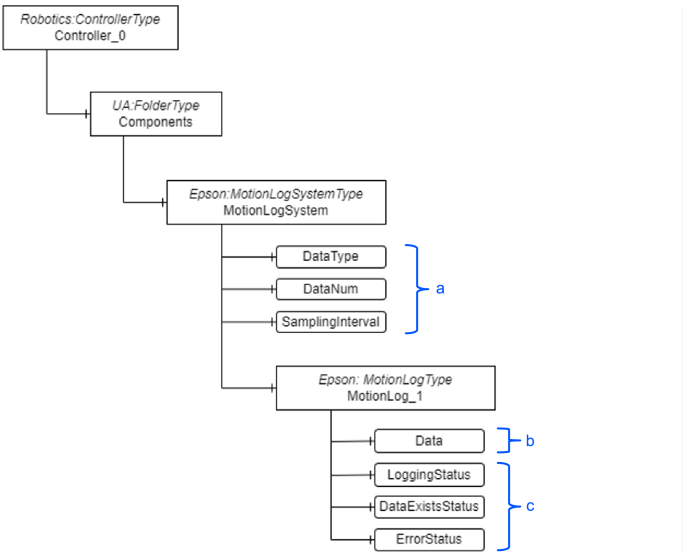
| 符號 | 說明 |
|---|---|
| a | 設定用節點 |
| b | 取得資料用節點 |
| c | 顯示狀態節點 |
← SPEL專案節點規格 機器人編號節點規格 →